
Smarter Time Sheets Templates for Australian Businesses
Discover how to choose and customize time sheets templates built for Australian businesses. Track hours, manage GST, and invoice clients with total accuracy.
Payly Team
February 18, 2026

If you’ve ever grabbed a generic timesheet template off the internet, you’ve probably discovered they create more headaches than they solve. For Australian freelancers and service businesses, these one-size-fits-all documents just aren't built for how we actually work, leading to messy workarounds and, worse, lost income.
This guide is about moving past that and creating a timesheet that actually works for you, one that captures every billable minute, every time.
Why Generic Time Sheets Fail Australian Businesses
That timesheet you downloaded from a global site might look clean and simple, but it rarely accounts for the day-to-day realities of running a service business in Australia. Those small frustrations quickly snowball, turning a simple admin task into a major time sink. The result? Inaccurate invoices and unpredictable cash flow.
The core issue is that these templates are completely ignorant of Australian financial and work regulations. This oversight forces you into a constant cycle of manual adjustments, completely defeating the purpose of using a template to save time and prevent mistakes in the first place.
The GST and Billable Hours Chaos
Right out of the gate, you'll notice the absence of a field for GST. Sure, a standard template lets you log hours and get a total, but it won’t help you isolate the 10% GST component for your BAS statement or invoices. You’re left to calculate it manually on every single billable item, which is not only a drag but also a recipe for errors.
Generic templates also treat all time as equal, which is a massive flaw.
For a consultant or a digital agency, not all hours are created equal. Time spent on a client project is billable, but an internal strategy meeting is not. A basic template that only tracks total hours forces you to manually sort through entries later to separate what’s billable from what’s not.
Navigating Local Work Rules and Holidays
Australia’s employment landscape has its own set of rules that generic templates completely miss. Public holidays are a perfect example. They vary from state to state, which can cause real problems.
Picture this: a Sydney-based agency has a remote team member in Melbourne. A generic calendar won't flag the Melbourne Cup Day public holiday, which could easily lead to incorrect payroll or messed-up project deadlines.
For any business juggling different pay rates or managing project timelines across state lines, this becomes a recurring nightmare. It’s exactly why so many Aussie businesses find that a generic approach to employee time tracking ends up costing them a fortune in lost productivity and admin overload. You need a solution that’s built for our local context.
Choosing the Right Timesheet Format for Your Workflow
Once you’ve moved beyond a one-size-fits-all template, the next big question is which format actually fits your day-to-day work. The right choice makes time tracking feel like a natural part of the job; the wrong one just adds another layer of admin hassle.
Most businesses lean on one of three options: Excel, Google Sheets, or a PDF. Each has its place, but the best one for you comes down to how your business really operates.
Are you constantly on the road at client sites with patchy internet? Or is your team spread out, needing to collaborate on project hours in real-time? Answering these simple questions will quickly point you in the right direction.
Excel Spreadsheets: The Offline Powerhouse
For many, Microsoft Excel is the default choice, and for good reason. Its real strength is its powerful offline capability. You can be on a job site with zero reception and still build complex timesheets with all the formulas you need for GST, penalty rates, or tracking project budgets.
The big drawback, though, is collaboration. As soon as you email that Excel file, you’ve lost control. Before you know it, you have multiple versions floating around, and pulling it all together for invoicing becomes a real headache.
Google Sheets: Built for Real-Time Teamwork
This is where Google Sheets really shines. It was built from the ground up for collaboration. Your whole team can jump into the same timesheet, make updates from wherever they are, and you can see it all happening live. For anyone managing multiple staff or projects, that single source of truth is invaluable.
The trade-off? It’s not great without an internet connection. It can also get a bit sluggish if you’re throwing massive amounts of data at it. For a solo operator, that’s rarely an issue, but for a growing agency with thousands of entries, it’s something to keep in mind.
This flowchart maps out how moving away from a generic document is the first step toward a more streamlined process.
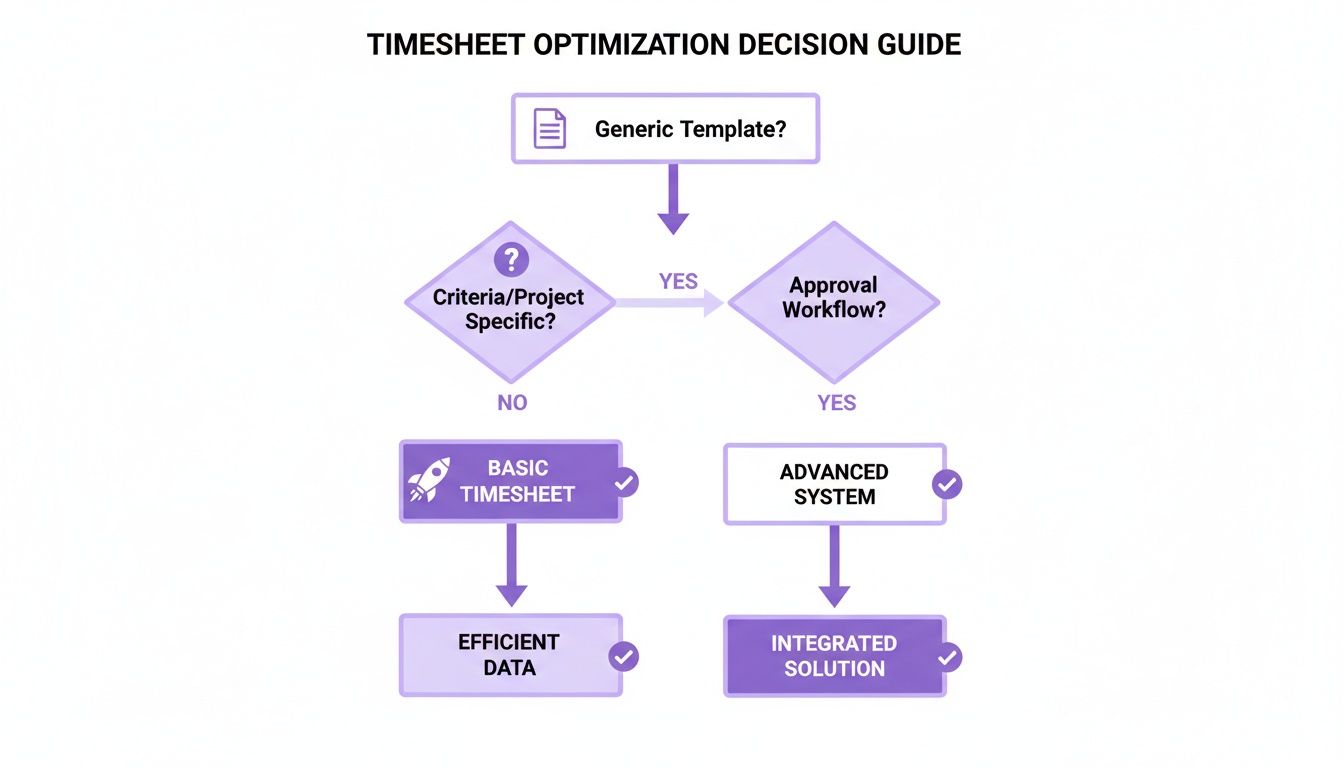
The key takeaway here is that actively choosing a system that fits your specific needs, rather than just settling for the default, is where you start seeing real gains in efficiency.
PDF Timesheets: The Simple, Printable Option
Think of a PDF timesheet as the modern version of a paper logbook. It’s perfect for when you just need a clean, uneditable record of hours.
Many freelancers send a finalised PDF timesheet with their invoice as a professional summary for client sign-off. It’s simple and looks tidy.
Of course, their biggest weakness is that they’re completely static. You can’t track time in a PDF or run calculations; all of that has to be done before you create it. They work best as the final output, not as the tool you use to track time as it happens.
To make the choice a little clearer, here’s a quick rundown of how each format stacks up.
Comparison of Timesheet Template Formats
| Format | Best For | Pros | Cons |
|---|---|---|---|
| Excel | Solo operators, complex calculations, or working in areas with no internet. | Unmatched offline power and deep customisation with formulas. | Terrible for live teamwork; quickly leads to version control chaos. |
| Google Sheets | Teams that need to collaborate in real-time from different locations. | Fantastic for collaboration, providing a single source of truth for everyone. | Needs a reliable internet connection; can slow down with very large datasets. |
| Creating a final, professional record for client approvals or archiving. | Universal, non-editable format that looks clean and professional. | Completely static. All calculations must be done manually beforehand. |
At the end of the day, the best format is the one your team will actually use consistently. A clever Excel sheet with complex macros is useless if no one understands it. A simple, shared Google Sheet that everyone updates daily will always be more effective.
While these tools are a fantastic starting point, they still depend on someone manually typing in the hours. For businesses ready to ditch the data entry, it's worth exploring dedicated software for timesheets that can automatically turn tracked time into professional, branded invoices.
The Anatomy of a Perfect Australian Timesheet
A timesheet is only ever as good as the information you put into it. I’ve seen it time and again: without the right fields, even the slickest-looking template can quickly become a source of confusion, leading to invoicing headaches and, worse, client disputes. To build a timesheet that actually works, you need to think beyond just jotting down start and end times.

For service businesses here in Australia, capturing the right details from the get-go makes everything downstream, from project management to getting paid, so much smoother. It’s all about creating a template that helps you, not hinders you.
Getting the Basics Right: Core Information
Every single entry on your timesheet needs context. Without these foundational details, you’re just left with a list of hours that are a nightmare to assign and impossible to bill accurately. Think of these fields as completely non-negotiable.
- Employee or Contractor Name: The most obvious one, but crucial. You need to know who did the work for payroll, job costing, and client records.
- Date: The specific date the work happened. This is essential for rolling up hours into weekly or fortnightly summaries that match your invoicing cycle.
- Client Name: This directly links the work to a specific customer. It sounds simple, but you’d be surprised how often it gets missed, making it impossible to bill correctly.
- Project or Job Code: A lifesaver if you handle multiple jobs for the same client. A unique code like 'ClientA-WebDev' versus 'ClientA-SEO' prevents mix-ups and ensures hours are allocated to the right budget.
Nailing these first few fields gives you the "who, when, and for whom" for every task. It's the first and most important step in stopping revenue from leaking through the cracks because of unbilled or misallocated hours.
The Nitty-Gritty: Task and Financial Details
This is where your timesheet goes from being a simple time log to a powerful pre-invoicing tool. These fields capture the details you absolutely need for Australian tax compliance and for keeping a finger on the pulse of your project’s profitability.
A detailed task description is your best friend when a client questions an invoice. Instead of a vague entry like "Graphic Design," try something more specific like, "Drafting initial logo concepts for Q3 campaign." That level of clarity justifies the time and keeps everyone on the same page.
One of the biggest mistakes I see is businesses failing to separate billable from non-billable time. You have to track hours spent on 'Internal Training' just as carefully as a billable 'Client Meeting'. It’s the only way to get a true picture of your project profitability and business overheads.
Here are the critical financial and task-related fields to include:
- Task Description: A short, sharp summary of the work that was done.
- Start Time & End Time: The specific times the task began and finished.
- Total Hours: This should ideally be an automatic calculation (End Time - Start Time) to cut down on human error.
- Billable Status (Yes/No): A simple dropdown or checkbox to separate revenue-generating work from internal tasks.
- GST Component: A dedicated field to calculate the 10% GST on billable hours. This is an absolute must-have for preparing your BAS and creating compliant invoices in Australia.
Trying to manage all this manually is a huge time-sink, especially for freelancers and small business owners. Insights from the Australian Bureau of Statistics’ Time Use Survey back this up; without solid systems, sole traders can easily lose track of billable hours while trying to piece together scattered notes at the end of the day. You can dig deeper into the drivers and uses of time-use data in Australia to see the full picture.
Fine-Tuning Your Timesheet for How You Actually Work
Having the right fields in your timesheet is a solid start, but the real efficiency boost comes from making the template do the heavy lifting for you. This is about transforming it from a simple logbook into a smart tool that understands the unique realities of working in Australia.
The goal is to move beyond just recording hours. A well-customised template pre-calculates your earnings, separates billable from non-billable time, and bakes in local business rules, saving you a massive amount of admin time and preventing mistakes down the line. To get this right, it can be helpful to think about the process in the same way you would approach mastering standard operating procedure templates with a focus on clarity and repeatable efficiency.
Let Simple Formulas Do the Maths
One of the most powerful things you can do with a spreadsheet template is to add formulas that calculate everything for you automatically. You don't need to be a spreadsheet whiz; a few basic functions are all it takes to see a huge payoff.
First, set up a formula to calculate the total hours worked each day from your start and end times. A common way to do this is (End Time - Start Time) * 24, which converts the result into decimal hours. Once you have that, a simple SUM function can give you the total for the week or fortnight.
Here's a pro tip: Set up separate columns to automatically calculate your billable versus non-billable totals. A simple
SUMIFformula can tell your spreadsheet to only add up the hours from rows you’ve flagged as ‘Billable’. This gives you an instant, invoice-ready figure without any manual tallying.
Bake in Australian Business Rules
Next, you need to build in the rules specific to doing business in Australia. Generic templates from overseas will never account for things like GST or state-by-state public holidays, but you can add them yourself.
-
Automatic GST Calculation: This is a must. Add a column specifically for GST and use a formula to multiply your total billable amount by 10% (
Billable Total * 0.10). Now, the exact GST figure you need for invoices and your BAS is calculated for you every single time. No more pocket calculator. -
Public Holiday Schedules: Public holidays are a patchwork across Australia. If your business is in Melbourne, you need to account for Melbourne Cup Day, whereas a Brisbane-based business has the Royal Queensland Show holiday. Simply add a column to flag these days. This helps you manage project deadlines and handle payroll accurately, especially if you have team members in different states.
-
Penalty Rates: If you work with staff or contractors who get penalty rates for weekends or public holidays, add a 'Rate Multiplier' column. You can then pop in values like 1.5 or 2.0 on the relevant days, and your total pay formula will automatically adjust to reflect the higher rate.
By building these local workflows directly into your time sheets templates, you create a system that truly works for your Australian business. It streamlines the whole process from tracking time to getting paid, cutting down on tedious admin and setting you up for faster, more accurate invoicing.
From Automated Timesheets to Faster Invoicing
Those manual templates we’ve been talking about? They’re a great starting point. But the real game-changer is when you automate the entire workflow, from the moment you start a timer to the moment cash hits your bank account.
Let’s be honest, the most draining part isn't just punching numbers into a spreadsheet. It's the painful, mind-numbing task of copying all that data over to create an invoice. This is exactly where static time sheets templates start to hold you back, creating a frustrating bottleneck that slows down your cash flow.
An integrated system completely gets rid of that gap. Instead of constantly switching between a spreadsheet and your invoicing software, you have a single platform where your tracked hours flow straight into a draft invoice. It’s ready to go when you are. The best part? No more double-handling data, which is where most mistakes creep in.
The Power of an Integrated Workflow
Picture this: you're tracking your time for a client project, right from an app on your phone. The second you hit 'stop', those hours are logged against the right client and project with no extra steps needed.
Then, when it's time to send the bill, you're not fumbling around exporting CSV files or copy-pasting line items. You just click a button. The system instantly pulls all the approved billable hours and whips up a professional, branded invoice for you.
This kind of connected approach does so much more than just save you a headache. It creates a seamless, reliable process that brings a new level of accuracy and consistency to your business operations.
- No More Manual Data Entry: Time is tracked and logged automatically, which drastically cuts down on the chance of human error.
- Invoicing in a Click: You can turn approved timesheets into detailed invoices with all the project info and GST calculated perfectly, just like that.
- Simpler Approvals: Your clients can review and approve everything online, giving you a crystal-clear record of the work they've signed off on.
This visual really captures the jump from a clunky, manual setup to a fluid system that directly connects your time tracking to your invoicing.
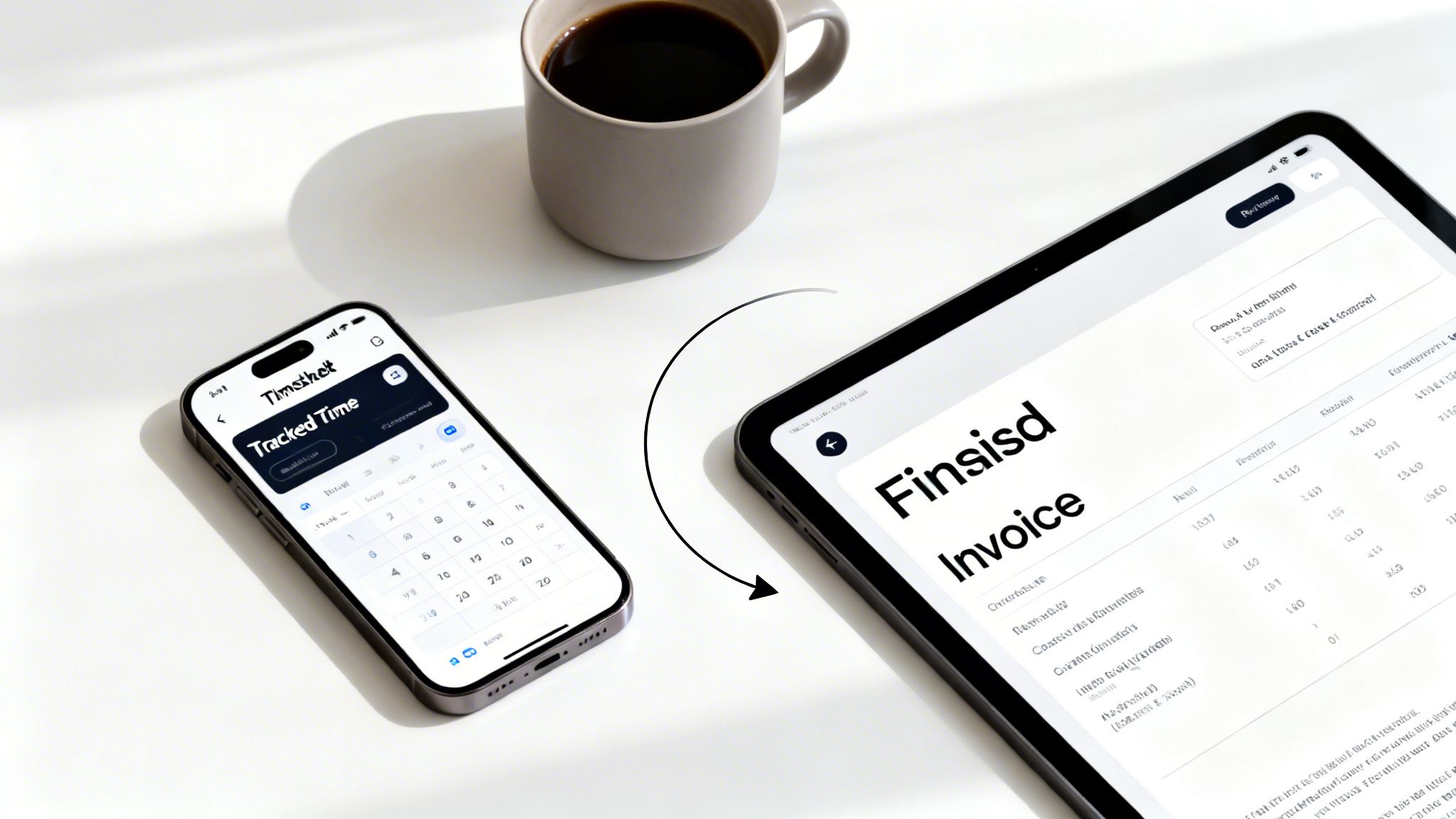
Ultimately, it means every minute you track is a concrete step toward getting paid, not just another bit of data you have to manage.
Turning Tracked Hours Directly into Revenue
With the way we work now, solid time tracking has never been more important. It was recently reported that Australians now average 41 hours online each week, which is more than a full-time job. For freelancers and small agencies, this really blurs the lines between billable hours and general screen time, making it incredibly easy to let valuable time slip through the cracks.
An automated system is smart enough to capture these work patterns properly. And its real value goes way beyond just spitting out an invoice. It's about having features that actively help you get paid faster, like:
- Automatic Payment Reminders: The system can chase up unpaid invoices for you, so you don't have to.
- Accounting Software Sync: It talks to tools like Xero, keeping your books accurate without you lifting a finger. If you're using both, check out our guide on the Stripe and Xero integration.
- Secure Payment Portals: Clients get a link to pay you directly from the invoice using gateways like Stripe.
By linking tracked time directly to your financial tools, you create a powerful system where every billable minute is captured, invoiced, and paid with minimal administrative effort.
As more businesses hunt for ways to work smarter, checking out the best time and attendance software is a logical next step. Platforms like Payly are built specifically to handle this entire workflow, turning your logged hours directly into revenue.
Your Top Australian Timesheet Questions Answered
Even with a great template, you're bound to have questions when you start putting timesheets into practice. It’s completely normal. Getting these details right from the start is key to building a workflow that’s efficient, compliant, and actually works for your business.
Let’s dive into a few of the most common questions we hear from freelancers and small business owners across Australia. These usually cover everything from legal standing to the nitty-gritty of tracking every minute of your day.
What’s the Best Free Timesheet Template for a Sole Trader in Australia?
If you're a sole trader just getting started, a solid Google Sheets template is hard to beat. It’s free, accessible from anywhere, and you can easily tweak it to fit your needs. Think adding columns for specific project codes or a simple calculation for GST; it’s a fantastic starting point for getting your time tracking organised.
But here's the catch: as your client list grows, you'll notice the time spent manually copying data from your spreadsheet into invoices really starts to add up. When the admin work begins to eat into your billable hours, that's your cue. It’s time to look at a system that can automatically turn those tracked hours into a professional invoice.
How Should I Track Non-Billable Hours?
This is a big one. So many service businesses forget to track their non-billable time, and it gives them a skewed view of their true profitability. Don't fall into that trap.
The simplest way to handle this is to add a dedicated column or a checkbox to your template labelled ‘Non-Billable’. Use it for everything you do that doesn't directly earn revenue.
Think internal meetings, quoting new work, marketing efforts, or even professional development. You can't bill a client for this time, but it’s still time spent on your business. Tracking it is the only way to get a clear picture of your overheads and make sure your billable rates are high enough to cover all your work, not just the client-facing stuff.
Are Digital Timesheets Legally Valid in Australia?
Absolutely. Digital timesheets are perfectly legal and accepted as official records in Australia, provided they are accurate, complete, and stored securely.
The Fair Work Act 2009 requires businesses to keep employee records for seven years, and digital formats are a completely legitimate way to do this.
For freelancers and contractors, a digital timesheet that your client has reviewed and signed off on acts as a clear record of the work you've delivered. It’s the foundation for your invoice. Using a system with a secure audit trail, like time-stamped entries and client approval logs, just adds another layer of professionalism and legal weight to your records. It means everyone is on the same page.
Ready to stop juggling spreadsheets and start automating your workflow? Payly combines smart time tracking, automated invoicing, and secure document management into one platform built for Australian businesses. Start your free 14-day trial and see how much time you can save.
Payly Team
Sharing insights and strategies to help service businesses thrive. Follow Payly for more tips on time tracking, invoicing, and business operations.
Related Articles


Ready to streamline your business?
Join thousands of freelancers and agencies who use Payly to track time, send invoices, and get paid faster.