
A Guide to Integrate Stripe with Xero for Australian Businesses
Learn to integrate Stripe with Xero to streamline your accounting. This guide covers setup, reconciliation, and GST for Australian freelancers and agencies.
Payly Team
February 19, 2026

Connecting Stripe with Xero is a pretty straightforward process, but the payoff is huge. You can get it done using Xero’s official integration or a specialised third-party connector. Either way, the goal is to get your sales data, payment fees, and customer details talking to each other automatically, which makes sorting out your books a whole lot easier.
Why Bother Connecting Stripe and Xero? It's All About Efficiency
If you're a freelancer or run an agency in Australia, you know the drill. You send an invoice, the client pays via Stripe, and then the real "fun" begins: trying to match that payment to the right invoice in Xero. It’s a tedious, manual slog that can easily lead to messy reconciliations, a fuzzy picture of your actual cash flow, and a real headache when it's time to figure out GST.
The whole point of linking Stripe and Xero is to cut out that manual grind, starting with getting your payments sorted smoothly. If you're looking for more general tips, mastering payment collection from customers is a great read for broader strategies.

A Smarter Way to Handle Your Finances
Hooking up Stripe to Xero isn't just a small convenience; it’s a smart business move. It helps you get paid quicker and keeps your financial records squeaky clean by putting your invoicing and payment cycle on autopilot.
Let’s quickly break down why this connection is so powerful for Aussie service businesses.
Key Benefits of the Stripe and Xero Integration
| Benefit | Impact on Your Business |
|---|---|
| Get Paid Faster | Xero found its customers get paid up to 14 days faster on average when using online payments. That’s a massive boost for your cash flow. |
| Automated Reconciliation | Stripe payouts land in your bank account and automatically match up with the right invoices in Xero. Say goodbye to hours of manual data entry. |
| Accurate Fee Tracking | Stripe’s fees are automatically recorded as expenses, so you always have a true understanding of your profit margin on every single job. |
| Simplified GST Reporting | With every transaction neatly logged, calculating your GST for your BAS becomes much less of a chore. No more guesswork. |
Ultimately, this integration transforms a frustrating, time-consuming task into a background process that just works.
This guide will walk you through exactly how to set it up, covering the different methods available so you can choose what’s best for your business. To see how this fits into your overall financial process, have a look at our deeper dive into https://www.payly.com.au/blog/invoicing-in-accounting.
Preparing Your Accounts for a Smooth Connection
Look, I've seen it time and time again: a business rushes to connect Stripe and Xero and ends up in a reconciliation nightmare. The secret to a successful integration doesn't start with clicking the "connect" button. It begins with a bit of prep work inside your Xero Chart of Accounts.
Think of it as laying the proper foundations before building a house. A few minutes spent organising your accounts now will save you hours of headaches later. This simple groundwork ensures every dollar from your Stripe sales and every cent in fees lands in the right place, making the whole process incredibly smooth.

Essential Xero Account Setup
Before you even think about linking the two platforms, we need to create a couple of specific accounts in your Xero Chart of Accounts. These are absolutely vital for tracking your income and the costs of getting paid. Nail this structure from the get-go, and your reconciliation will practically run itself.
Here are the two non-negotiable accounts you’ll need to set up:
- A "Stripe Clearing Account": This isn't your real-world bank account. It's a special type of "Current Asset" account that acts as a temporary holding bay. All your gross sales revenue from Stripe will flow into this account first.
- A "Stripe Fees" Expense Account: This is exactly what it sounds like, a dedicated expense account. All those transaction fees that Stripe deducts will be recorded here, giving you a crystal-clear picture of your payment processing costs.
Why bother with this? The clearing account solves the biggest reconciliation problem: trying to match a single lump-sum payout from Stripe against dozens, or even hundreds, of individual customer invoices. It’s a game-changer.
Final Pre-Integration Checks
With your new Xero accounts ready to go, there are just a couple more items on your pre-flight checklist. These final checks are all about making sure the data flows correctly and meets Australian business requirements. Honestly, it’s the small details that often cause the most frustrating sync errors.
I can't tell you how many times I've seen currency settings cause a mess. Don't just assume they'll align. You need to manually confirm that both your Stripe and Xero accounts are locked to Australian Dollars (AUD). This is crucial for accurate GST calculations.
Before you move on, quickly confirm these two points:
- Currency and Country Alignment: Double-check that your primary currency in both Stripe and Xero is set to AUD. Mismatched currencies are a top cause of integration failures and dodgy financial reports.
- Active Bank Feeds: Ensure the bank account where Stripe actually deposits your money has an active bank feed connected in Xero. Without this, Xero won’t see the payouts when they land, and you’ll be back to manual matching.
Once you’ve ticked these boxes, you’re in great shape. You've built a solid foundation, and your accounts are now perfectly structured to handle the flow of data from Stripe. Now, you're truly ready to connect.
Choosing Your Stripe and Xero Integration Method
There’s more than one way to connect Stripe and Xero, and honestly, the best path forward depends entirely on your business. What works for a freelancer with ten invoices a month won't cut it for an e-commerce store with a thousand daily sales. Your choice boils down to your transaction volume, the complexity of your sales, and just how granular you need your financial reports to be.
Getting this right from the start is the key to clean, automated bookkeeping down the track.
For many Aussie businesses just starting out, the official integration you can grab from the Xero App Store is a great first step. It’s built for simple setups where you mainly need to link Stripe payments to your Xero invoices and get some basic reconciliation happening. It handles the fundamentals perfectly well.
But as you scale, you’ll likely bump up against its limits. If you're dealing with a high volume of transactions, juggling multiple currencies, or running a subscription service, you’ll quickly need something with a bit more muscle.
The Official Xero App Store Integration
The most straightforward way to link the two platforms is through the official app. I usually recommend this for freelancers, consultants, and small agencies who have a manageable number of transactions each month.
The Xero App Store is packed with tools designed to extend its core functionality, and the Stripe app is a popular one for good reason.
At its heart, this integration adds a simple “Pay with Card” button to your Xero invoices, giving clients an easy way to pay you on the spot. Once they pay, that transaction syncs over to Xero, which helps simplify reconciliation.
The biggest catch with the official app is that it often syncs payouts as a single lump sum. This means a single deposit in your bank account might represent dozens of individual invoice payments. You're then left to manually match them all up, which can become a real headache as your business grows.
When to Look at a Third-Party Connector
If you’re starting to spend a few hours every month untangling Stripe payouts, or if your business model is just a bit more complex, it’s definitely time to explore a third-party connector. These are specialised tools designed to handle the heavy lifting the native integration simply can’t.
When you're weighing up your choices, it’s worth getting a feel for the different Stripe integration options out there.
A third-party tool is probably your next move if any of these sound familiar:
- You have a high volume of transactions. We’re talking hundreds or thousands of sales a month, where manual reconciliation is just out of the question.
- You need detailed financial reporting. You need to see the line-item detail for every single sale, things like SKU-level tax info, specific customer data, and a precise breakdown of every fee.
- You operate in multiple currencies. You bill clients in USD, EUR, or other currencies and need to correctly account for foreign exchange gains or losses without pulling your hair out.
- You run a subscription or SaaS business. Your revenue is recurring, and you need to properly manage deferred revenue and complex billing cycles.
Tools like A2X or Silver Siphon were built for these exact scenarios. They work by creating a detailed sales summary for each Stripe payout that lands in your bank account, matching it perfectly. This summary breaks down everything, individual sales, refunds, and every last fee, giving you 100% accurate, one-click reconciliation every single time.
Mastering Payout Reconciliation in Xero
This is where the magic really happens, but frankly, it's also where a lot of people get stuck. You see a lump-sum deposit from Stripe hit your bank account, but how on earth do you match it to the dozens of individual customer invoices it represents?
The secret lies in that Stripe Clearing Account we set up earlier. Think of it as a temporary holding bay for your money inside Xero.
Here’s the flow: when a customer pays an invoice, the full amount gets recorded as a payment into this clearing account. A few days later, Stripe sends the payout, and that deposit shows up on your bank feed. Your task is to reconcile this deposit not as new income, but as a simple "transfer" from the Stripe Clearing Account to your actual business bank account.
This small step is crucial. It keeps your sales figures clean and accurate, completely separate from the movement of cash. It solves the number one headache of matching a single payout to multiple sales.
The Reconciliation Workflow in Action
Let's walk through a real-world example. Imagine you had a great Monday and made three sales, all paid through Stripe:
- Invoice 101: A$220 (including GST)
- Invoice 102: A$330 (including GST)
- Invoice 103: A$550 (including GST)
At this point, your Stripe Clearing Account in Xero is showing a balance of A$1,100. Let’s say Stripe’s total fees for these transactions came to A$20. On Wednesday, you’ll see a deposit of A$1,080 land in your business bank account from Stripe.
Now, in Xero's bank reconciliation screen, you don't match this deposit directly to the invoices. Instead, you'll use the "Find & Match" feature to locate those three payments (totalling A$1,100) sitting in your clearing account. The A$20 difference is the Stripe fee, which you’ll code directly to your "Stripe Fees" expense account. It's a beautifully clean process that ensures every dollar is accounted for.
If you want to get better at tracking costs like these, check out our detailed guide on managing expenses in Xero.
This infographic outlines the typical paths you might take when deciding how to integrate your payment and accounting systems.
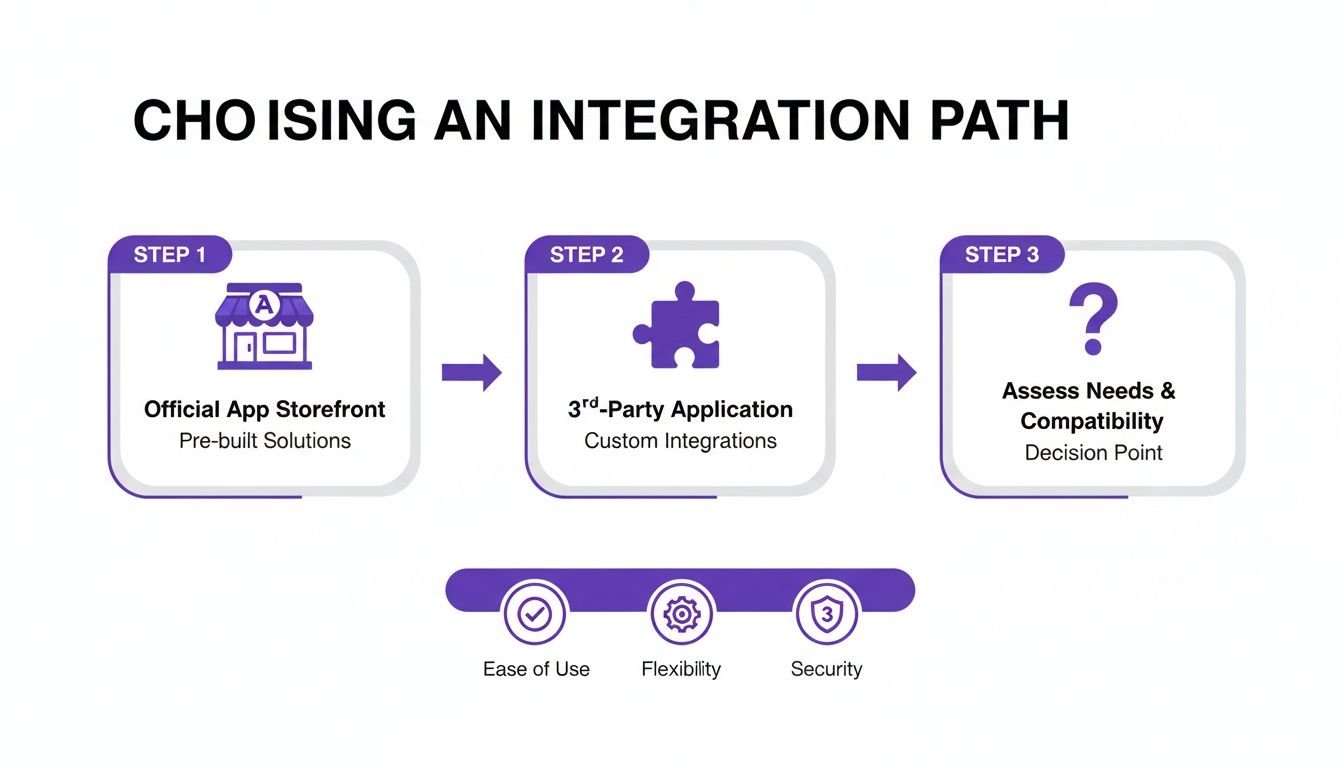
The visualisation highlights that while official apps are great for simple needs, third-party connectors offer more power for complex or high-volume operations.
Automating the Process With Bank Rules
Manually matching these payouts is fine, but you can automate most of the heavy lifting by creating a bank rule in Xero. Honestly, this is a game-changer for saving time.
A well-crafted bank rule can turn hours of manual reconciliation into a few satisfying clicks. The trick is to make the rule specific enough to avoid errors but flexible enough to catch all your Stripe payouts.
You can set up a rule that looks for any transaction from your bank feed where the payee contains "STRIPE". From there, you just instruct Xero to automatically create a transaction that splits the deposit: one part as a transfer from the Stripe Clearing Account, and the remainder as an expense coded to Stripe Fees.
Getting this automation right is more important than ever. Australia's Stripe ecosystem has seen payment volumes increase fivefold from 2019 to 2023, with over A$200 billion processed by local businesses during that time. You can learn more about Stripe's role in Australian digital commerce and see just how massive the volume is.
With that kind of activity, manual reconciliation just isn't sustainable. Setting these systems up properly from the start is absolutely essential to manage your finances as you grow.
Handling Refunds, Disputes, and GST Accurately
Let's face it, business isn't always smooth sailing. Sooner or later, you'll have to process a customer refund or deal with a payment dispute. These aren't just customer service headaches; they are critical accounting events. Handling them with precision is key to keeping your financial records accurate and compliant.
When you've got Stripe and Xero talking to each other, managing these exceptions becomes a much cleaner process. But here's the catch: simply hitting 'refund' in your Stripe dashboard isn't the end of the story. You need to make sure the entire transaction is correctly reversed in Xero, and that involves more than just sending the money back. It's about making your books reflect what actually happened.
Managing Customer Refunds Correctly
When you issue a refund through Stripe, the customer gets their money back, but the original Stripe processing fee is almost always not refunded to you. This trips a lot of people up. Your accounting needs to show two things: the original sale being reversed, and that non-refundable fee being captured as a business expense.
A solid refund workflow in Xero should look something like this:
- Create a Credit Note: First, find the original paid invoice in Xero. From there, create a credit note for the amount you refunded. This is the official step that reverses the sale in your books.
- Record the Refund Payment: Apply the refund against that new credit note. Crucially, make sure you record this payment as coming out of your Stripe Clearing Account.
- Account for the Fee: The Stripe fee from the original sale doesn't disappear. It remains an expense and should stay coded to your "Stripe Fees" account.
Following this process ensures your sales revenue is accurately reduced, the customer's returned payment is accounted for, and your expenses are correctly stated. It keeps your profit and loss statement clean and honest.
Handling Chargebacks and Disputes
A chargeback is a whole different beast. It's more complex than a simple, voluntary refund. When a customer disputes a charge, Stripe will usually withdraw the disputed amount plus a separate dispute fee from your account while they investigate.
The key to handling disputes is to treat them as two separate transactions in Xero. The first is the reversal of the original sale (similar to a refund), and the second is a new expense for the dispute fee. Don’t bundle them together, or you’ll lose visibility on your dispute costs.
This separation is vital for tracking how much chargebacks are truly costing your business.
Navigating GST on Refunds and Credit Notes
For any Australian business, getting Goods and Services Tax (GST) right is non-negotiable. When you refund a sale, you are also refunding the GST you collected on it. Your Xero credit note absolutely must account for this correctly to ensure your next Business Activity Statement (BAS) is accurate.
The good news is that when you create the credit note from the original invoice, Xero should automatically calculate the GST component for you. This adjustment correctly reduces your GST liability for that reporting period, keeping you compliant with the ATO.
For a deeper dive into the nuts and bolts, you can learn more about how to calculate GST in Australia in our dedicated guide.
Your Top Stripe and Xero Questions, Answered
Even when the initial setup goes off without a hitch, you'll inevitably run into some practical questions as you start using Stripe and Xero together day-to-day. Getting these sorted early on is key to building good habits and making sure your financial data is spot-on from the get-go.
Let's dive into some of the most common queries we hear from business owners.
How Do I Correctly Account For Stripe Fees in Xero?
The cleanest way to handle this is by setting up a dedicated expense account in your Xero Chart of Accounts, something like ‘Stripe Fees’ or ‘Payment Gateway Fees’. We flagged this in the prep stage, and it really is the secret to keeping things tidy.
When a payout from Stripe lands in your bank account, you’ll reconcile it against the gross invoices it covers. The gap between what your customers paid and what you actually received is, of course, the Stripe fee. You simply code that difference to your new ‘Stripe Fees’ expense account. Doing this gives you a perfect, real-time picture of exactly how much you're spending on payment processing.
Can I Connect Multiple Stripe Accounts To a Single Xero File?
This comes up a lot, especially for businesses running a few different brands or online stores. The short answer is yes, but not with the official, native Xero integration; that’s built for a simple one-to-one connection.
For this kind of setup, you'll need to use a third-party connector app. These tools are designed specifically for more complex scenarios, letting you pipe in data from several Stripe accounts into one Xero organisation. They handle the mapping so everything ends up in the right place without creating a bookkeeping nightmare.
A word of caution: trying to jury-rig multiple Stripe accounts through the native integration will only lead to reconciliation headaches. It’s a far better move to invest in a purpose-built connector if your business needs it.
What Is a Stripe Clearing Account and Why Is It So Important?
Think of a ‘Stripe Clearing Account’ as a virtual waiting room for your money. It’s a temporary holding account you create in Xero (usually set up as a current asset).
Here’s how it works: when a customer pays, the full sale amount is recorded in this clearing account immediately. A couple of days later, Stripe deposits the net amount (sales minus fees) into your actual bank account. You then reconcile this bank deposit by creating a transfer that moves the funds out of the clearing account. This makes matching a single large payout to dozens of smaller invoices incredibly straightforward, solving the biggest reconciliation puzzle most people face.
How Does The Integration Handle Different Currencies?
If you're invoicing clients in currencies other than AUD, you'll first need to be on a Xero plan that supports multi-currency. While the native integration can handle some basic foreign currency transactions, it’s not always the most powerful option.
This is another area where third-party connectors really shine. They automatically manage foreign exchange conversions and properly record any realised currency gains or losses. For accurate financial reporting, this is non-negotiable, especially with rates that change daily. Without a good tool, you’re left manually calculating conversions, a task that's not only a time sink but also incredibly easy to get wrong.
Streamlining your agency's finances is just the beginning. Payly is the all-in-one platform that replaces five different subscriptions by combining time tracking, smart invoicing, e-signatures, and more into a single interface designed for Australian businesses. Stop switching between apps and start running your operations more efficiently. Explore how Payly can simplify your business today.
Payly Team
Sharing insights and strategies to help service businesses thrive. Follow Payly for more tips on time tracking, invoicing, and business operations.
Related Articles


Ready to streamline your business?
Join thousands of freelancers and agencies who use Payly to track time, send invoices, and get paid faster.