
Organise All Your Business Documents in One Secure Place
Never lose another contract, invoice, or important file. Secure cloud document management with smart organisation, version control, and client portals built for Australian agencies and freelancers.
Bank-level security • Unlimited storage • 14-day free trial
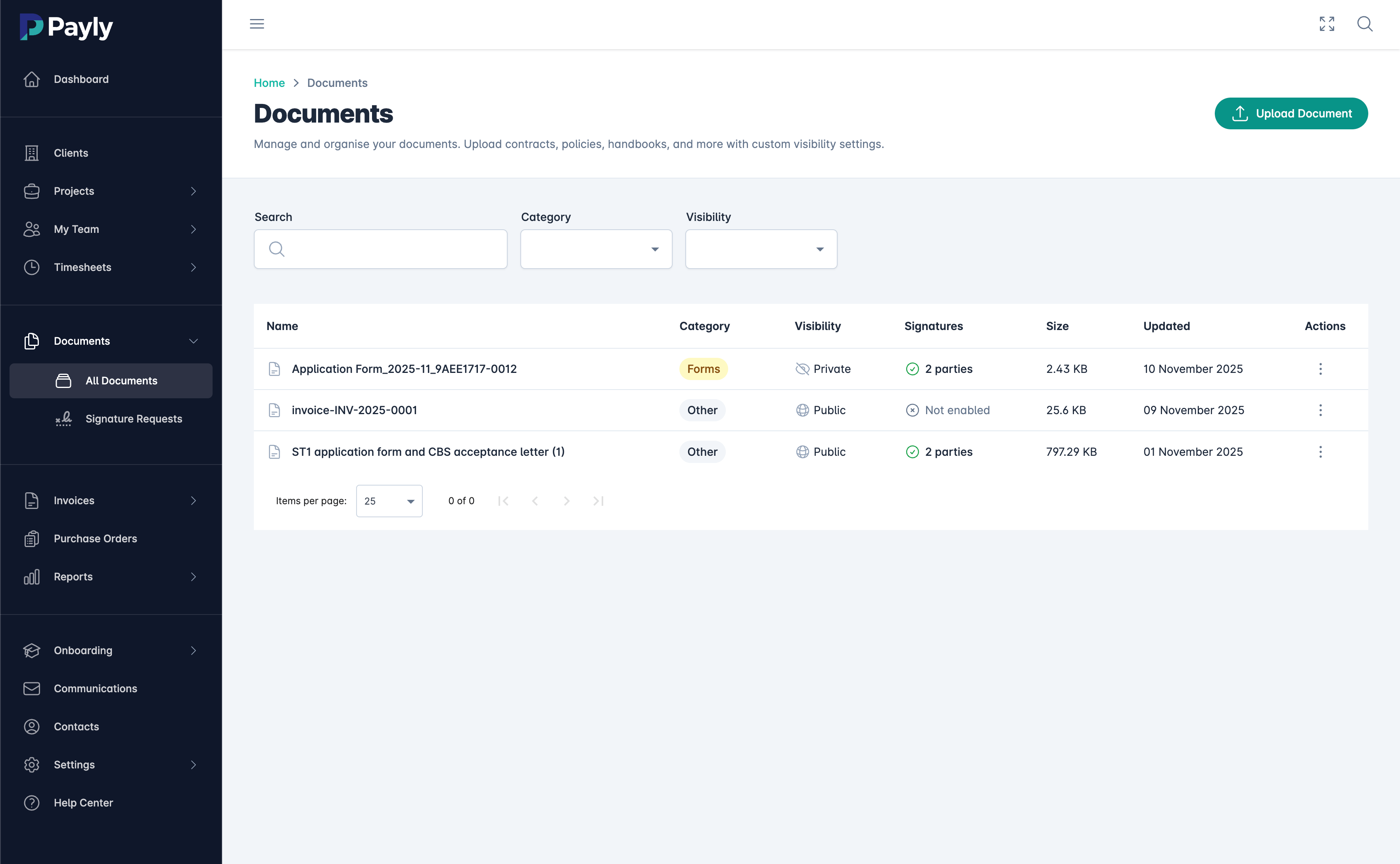
What is Document Management Software?
Document management software (also called a document management system or DMS) is a digital solution for storing, organizing, tracking, and managing all your business documents in one secure cloud location. Instead of scattered files across email attachments, desktop folders, Google Drive, Dropbox, and filing cabinets, document management software centralizes everything with powerful search, version control, and access management.
For Australian agencies, freelancers, and consultants, proper document management is critical for business efficiency and compliance. When you need to find a signed contract from 18 months ago, or share the latest version of a proposal with your team, or prove what was agreed in a client discussion, you need documents organised and accessible - not buried in someone's email inbox or lost on an old laptop.
Payly's document management system is designed specifically for service businesses. Every invoice, contract, proposal, timesheet, and signed document automatically files itself in the right client folder. Need to find something? Full-text search finds any document in seconds. Need to share with a client? Create a secure client portal with one click. Need to prove what was signed? Every document includes complete version history and audit trails.
The best document management systems integrate seamlessly with your existing workflow. With Payly, invoices save automatically when you bill clients, signed contracts file themselves after e-signature completion, and project documents organise by client without manual sorting. This automated approach means your team spends zero time on filing, and 100% confidence that every important document is backed up, searchable, and secure.
Everything You Need to Manage Documents
Professional document management features without the enterprise complexity
Smart Organisation
Documents automatically organise by client, project, and type. Create custom folder structures, tags, and categories to match how your business works.
Full-Text Search
Find any document in seconds with powerful full-text search. Search by filename, content, client name, date range, document type, or custom tags.
Version Control
Complete version history for every document. Track changes, see who edited what and when, and restore previous versions if needed. Never lose important edits.
Secure File Sharing
Share documents securely with clients and team members. Create time-limited sharing links, password-protected downloads, and view-only access.
Client Portals
Give clients secure access to their own documents. Each client gets a private portal to view invoices, contracts, and project files without cluttering email.
Bank-Level Security
256-bit SSL encryption with data stored in AWS S3 (ISO 27001 & SOC 2 certified infrastructure). Your documents are more secure in Payly than on your laptop or email.
Document Preview
View documents instantly without downloading. Preview PDFs, Word docs, images, spreadsheets, and more directly in your browser.
Automatic Backups
All documents automatically backup to multiple secure data centers. Protection against hardware failure, accidental deletion, and ransomware.
Mobile Access
Access your documents from anywhere with Payly mobile apps. View, download, and share documents from your smartphone or tablet on the go.
Stop Wasting Time Searching for Files
Studies show office workers spend 2.5 hours per day searching for information. For a team of 5, that's 12.5 hours of lost productivity every single day. Here's how Payly solves this:
Time Saved Calculator
From Chaos to Organisation in 3 Steps
Get your documents organised today
Upload Your Documents
Drag and drop all your existing documents into Payly. Upload individually or in bulk. We support PDFs, Word docs, Excel, images, and more.
Organise Automatically
Payly automatically organizes documents by client and type. Add custom tags and folders to match your workflow. Future documents file themselves.
Find Anything Instantly
Use powerful search to find any document in seconds. Share with clients via secure portals. Access from anywhere on any device.
Built for Every Document Type
From client contracts to team files
Client Documents
Store all client-related documents in one place: contracts, proposals, invoices, briefs, deliverables, and communications. Each client gets their own organised folder.
Financial Records
Keep invoices, receipts, tax documents, and financial reports organised and accessible. Make tax time stress-free with instant document retrieval.
Legal & Compliance
Secure storage for contracts, NDAs, insurance certificates, licenses, and compliance documents. Complete audit trails for regulatory requirements.
HR Documents
Manage employment contracts, onboarding documents, performance reviews, and team policies. Secure, compliant storage for sensitive employee information.
Project Files
Organise project briefs, creative assets, feedback, approvals, and final deliverables. Keep entire project histories accessible for future reference.
Marketing Assets
Store brand guidelines, logos, templates, marketing materials, and campaign assets. Version control ensures everyone uses the latest approved versions.
Integrated with Your Entire Workflow
Documents automatically save from your business operations
Automatic Invoice Filing
Every invoice you create automatically saves to the client's document folder. No manual filing, perfect organisation every time.
Signed Contract Storage
Completed e-signature documents automatically file with full audit trails. Always know who signed what and when.
Timesheet Exports
Export and save timesheet reports for project records, client reporting, or internal documentation. Automatic archiving by date and client.
Purchase Order Records
All purchase orders and approvals automatically store with complete history. Track spending and maintain vendor records effortlessly.
Document Management FAQs
Common questions about Payly's document management
How secure is document storage in Payly?
Payly uses bank-level 256-bit SSL encryption for all documents in transit and at rest. All data is stored securely in AWS S3 (ISO 27001 & SOC 2 certified infrastructure). Your documents are safer in Payly than on your laptop, email server, or consumer cloud storage like Dropbox.
Is there a limit on storage space?
No. Payly includes unlimited document storage in all plans. Upload as many documents as you need without worrying about storage limits or overage fees. Most businesses store 10-50GB without any issues.
Can clients access their own documents?
Yes. You can create secure client portals that give each client access to their own documents only. Clients can view and download invoices, contracts, and project files 24/7 without needing to email you. You control exactly what each client can see.
What file types can I store in Payly?
Payly supports all common file types including PDFs, Word documents (.doc, .docx), Excel spreadsheets (.xls, .xlsx), PowerPoint (.ppt, .pptx), images (JPG, PNG, GIF), and more. You can also store zip files, videos, and other file formats.
How does version control work?
When you upload a new version of an existing document, Payly automatically saves the previous version. You can view complete version history, see who made changes and when, and restore any previous version if needed. This prevents losing important document revisions.
Can I access documents on mobile devices?
Yes. Payly's mobile apps (iOS and Android) give you full access to your document library on the go. View, download, and share documents from your smartphone or tablet. Perfect for when you need to reference a contract while meeting with clients.
What happens if I accidentally delete a document?
Deleted documents move to a recycle bin where they remain for 30 days before permanent deletion. You can restore any document from the recycle bin with one click. Additionally, all documents are automatically backed up to multiple secure data centers for redundancy.
Can I migrate my existing documents from Google Drive or Dropbox?
Yes. Payly makes it easy to migrate your existing documents. You can bulk upload files from your computer, or we can help you migrate from Google Drive, Dropbox, OneDrive, or other cloud storage services. Our support team can assist with large migrations.
Get Your Documents Organised Today
Stop wasting time searching for files. Secure, organised document management with unlimited storage included in every Payly plan.
14-day free trial • Unlimited storage • Bank-level security