
The DocuSign Alternative for Australian Businesses
Get contracts, proposals, and agreements signed faster with legally binding e-signatures. Secure, compliant, and affordable electronic signature software built for agencies and freelancers.
No credit card required • Legally binding in Australia • 14-day free trial
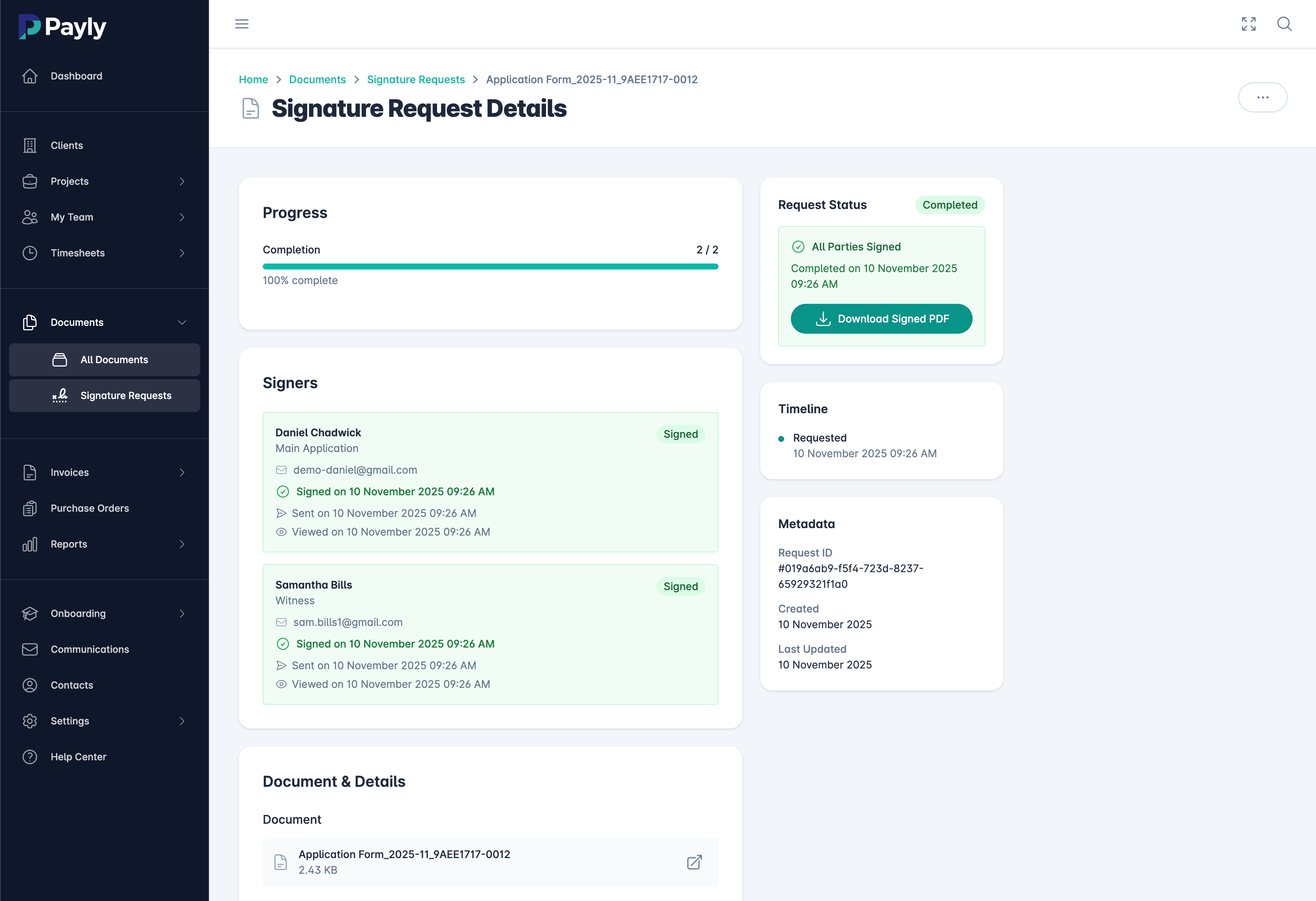
What is E-Signature Software?
E-signature software (also called electronic signature software or digital signature software) allows you to sign documents digitally without printing, scanning, or mailing. Instead of the traditional process of printing a contract, signing it with a pen, and scanning it back, e-signature software lets you and your clients sign documents online from any device in seconds.
For Australian agencies, freelancers, and consultants, e-signature software is essential for modern business operations. Whether you're signing client contracts, proposal agreements, NDAs, employment contracts, or service agreements, electronic signatures are legally binding in Australia under the Electronic Transactions Act 1999. This means documents signed with e-signature software have the same legal weight as traditional handwritten signatures.
Payly's e-signature solution is designed as an affordable DocuSign alternative for Australian businesses. While DocuSign can cost $40-100+ per user per month, Payly includes unlimited e-signatures as part of our all-in-one platform at just $49/month. You get the same legally binding signatures, audit trails, and professional document workflows without the enterprise price tag.
The best e-signature software integrates seamlessly with your existing workflow. With Payly, you can send proposals, contracts, and invoices for signature directly from your dashboard, track signature status in real-time, and automatically file signed documents in your document management system. This streamlined approach means contracts get signed 5x faster on average, helping you close deals and start projects without delays.
Everything You Need for Secure E-Signatures
Professional electronic signature features at a fraction of DocuSign's cost
Legally Binding Signatures
E-signatures created in Payly are fully compliant with Australian electronic signature laws. Each signature includes timestamp, IP address, and identity verification for complete legal protection.
Multiple Document Types
Send any document for signature - proposals, contracts, NDAs, employment agreements, service agreements. Supports PDF, Word, and other common formats.
Multiple Signers
Send documents to multiple people for signatures. Define signing order (sequential or parallel), assign fields to specific signers, and track each person's status separately.
Complete Audit Trail
Every signature includes a detailed audit log: who signed, when they signed, from what IP address, and what device they used. Complete documentation for legal compliance.
Custom Fields & Templates
Add signature fields, date fields, text fields, and checkboxes anywhere in your document. Save frequently used documents as templates for instant reuse.
Automatic Reminders
Set up automatic email reminders for unsigned documents. Gentle nudges ensure clients sign on time without you having to follow up manually.
Mobile-Friendly Signing
Signers can sign from any device - desktop, tablet, or mobile. Touch-optimised signature experience works perfectly on smartphones for signing on the go.
Bank-Level Security
256-bit SSL encryption protects your documents in transit and at rest. Data stored in AWS S3 (ISO 27001 & SOC 2 certified infrastructure) ensures your sensitive contracts are always secure.
Integrated Document Storage
Signed documents automatically save to your Payly document library. Organise by client, project, or category. Search and retrieve any signed document instantly.
Close Deals 5x Faster
The average contract takes 5-7 days to get signed using traditional methods (print, sign, scan). With e-signatures, most documents are signed within 24 hours. Here's what this means for your business:
Cost Comparison
Get Signatures in 3 Simple Steps
From upload to signed document in minutes
Upload Your Document
Upload any PDF, Word doc, or create from template. Drag and drop signature fields, date fields, and text fields exactly where you need them.
Send for Signature
Add recipient email addresses and customise the message. Set signing order if needed. Click send and Payly emails a secure signing link to each recipient.
Get Signed Document
Recipients sign with one click from any device. You receive instant notification when signed. Completed document with audit trail automatically saves to your library.
Built for Every Business Document
From client contracts to employee onboarding
Client Contracts
Send service agreements, master service agreements, and retainer contracts for instant signature. Start projects faster and reduce contract turnaround from days to hours.
Proposals & Quotes
Add signature fields to your proposals so clients can approve and sign in one step. Win more business by making it effortless for clients to say yes.
NDAs & Confidentiality
Protect your business with legally binding non-disclosure agreements. Send NDAs before project kickoffs, client meetings, or sharing sensitive information.
Employment Contracts
Onboard new team members efficiently with electronic employment contracts. Include offer letters, contractor agreements, and employee handbooks all in one workflow.
Vendor Agreements
Sign agreements with suppliers, contractors, and partners. Streamline procurement with digital signatures on purchase orders and vendor contracts.
Approval Workflows
Get internal approvals on project plans, budget requests, and policy changes. Sequential signing ensures documents route through the right people in order.
100% Legally Compliant in Australia
E-signatures that hold up in court
Electronic Transactions Act 1999
Under Australian law, e-signatures are legally equivalent to handwritten signatures. The Electronic Transactions Act 1999 recognises electronic signatures as valid for most business transactions, with the same legal weight as traditional signatures.
Identity Verification
Email verification and optional SMS/2FA ensure the person signing is who they claim to be.
Consent to Sign
Signers explicitly agree to use electronic signatures before signing, documenting clear consent.
Complete Audit Trail
Detailed logs of who signed, when, from what IP, and what device provide forensic proof.
Payly vs DocuSign vs Adobe Sign
Why Australian businesses choose Payly
| Feature |
Payly
$49/mo
|
DocuSign
$40-100/mo
|
Adobe Sign
$35-70/mo
|
|---|---|---|---|
| Unlimited E-Signatures | Limited | Limited | |
| Legally Binding in Australia | |||
| Complete Audit Trail | |||
| Mobile Signing | |||
| Document Templates | |||
| Integrated Time Tracking | |||
| Integrated Invoicing | |||
| Document Management | Add-on | Limited | |
| All-in-One Platform |
Get everything DocuSign offers plus time tracking, invoicing, and more
Start Free TrialE-Signature FAQs
Common questions about electronic signatures
Are e-signatures legally binding in Australia?
Yes, absolutely. Under the Electronic Transactions Act 1999, e-signatures are legally binding in Australia and have the same legal weight as handwritten signatures. Payly's e-signature solution complies with all Australian legal requirements including identity verification, consent documentation, and complete audit trails.
How is Payly different from DocuSign?
While DocuSign focuses solely on e-signatures ($40-100/month per user), Payly is an all-in-one platform that includes unlimited e-signatures plus time tracking, invoicing, document management, and purchase orders for just $49/month total. You get the same legally binding signatures with audit trails, but integrated into your complete business workflow at a fraction of the cost.
Can multiple people sign the same document?
Yes. You can send documents to multiple signers and define the signing order. Use sequential signing when signatures need to happen in a specific order (e.g., employee signs first, then manager approves), or parallel signing when multiple people can sign simultaneously.
What types of documents can I send for e-signature?
You can send any business document for e-signature including client contracts, service agreements, proposals, NDAs, employment contracts, vendor agreements, and more. Payly accepts PDF and Word documents. Simply upload your document, add signature fields, and send.
How does the audit trail work?
Every e-signature in Payly includes a complete audit trail that logs: who viewed the document, when they viewed it, what IP address they used, what device they signed from, and the exact timestamp of the signature. This audit trail is permanently attached to the signed PDF and provides forensic proof of signature validity.
Can signers use e-signatures on mobile devices?
Yes. Payly's signing experience is fully optimised for mobile devices. Recipients can sign from their smartphone or tablet using touch to create their signature. No app download required - just click the link in the email and sign from any browser.
What happens to signed documents?
Once all parties sign, the completed document with embedded audit trail is automatically saved to your Payly document library. Both you and all signers receive a copy via email. Documents are securely stored with 256-bit encryption and can be searched and retrieved anytime.
Is there a limit on how many documents I can send?
No. Payly includes unlimited e-signatures in all plans. Unlike DocuSign which charges per envelope or has transaction limits, you can send as many documents for signature as you need each month with no additional fees or overage charges.
The Smarter DocuSign Alternative
Get legally binding e-signatures plus time tracking, invoicing, and document management. All in one platform for $49/month.
14-day free trial • No credit card required • Legally binding signatures