
Control Spending with Smart Purchase Orders
Streamline procurement with approval workflows, budget tracking, and vendor management. Create professional purchase orders in seconds and maintain complete control over business spending.
No credit card required • Unlimited purchase orders • 14-day free trial
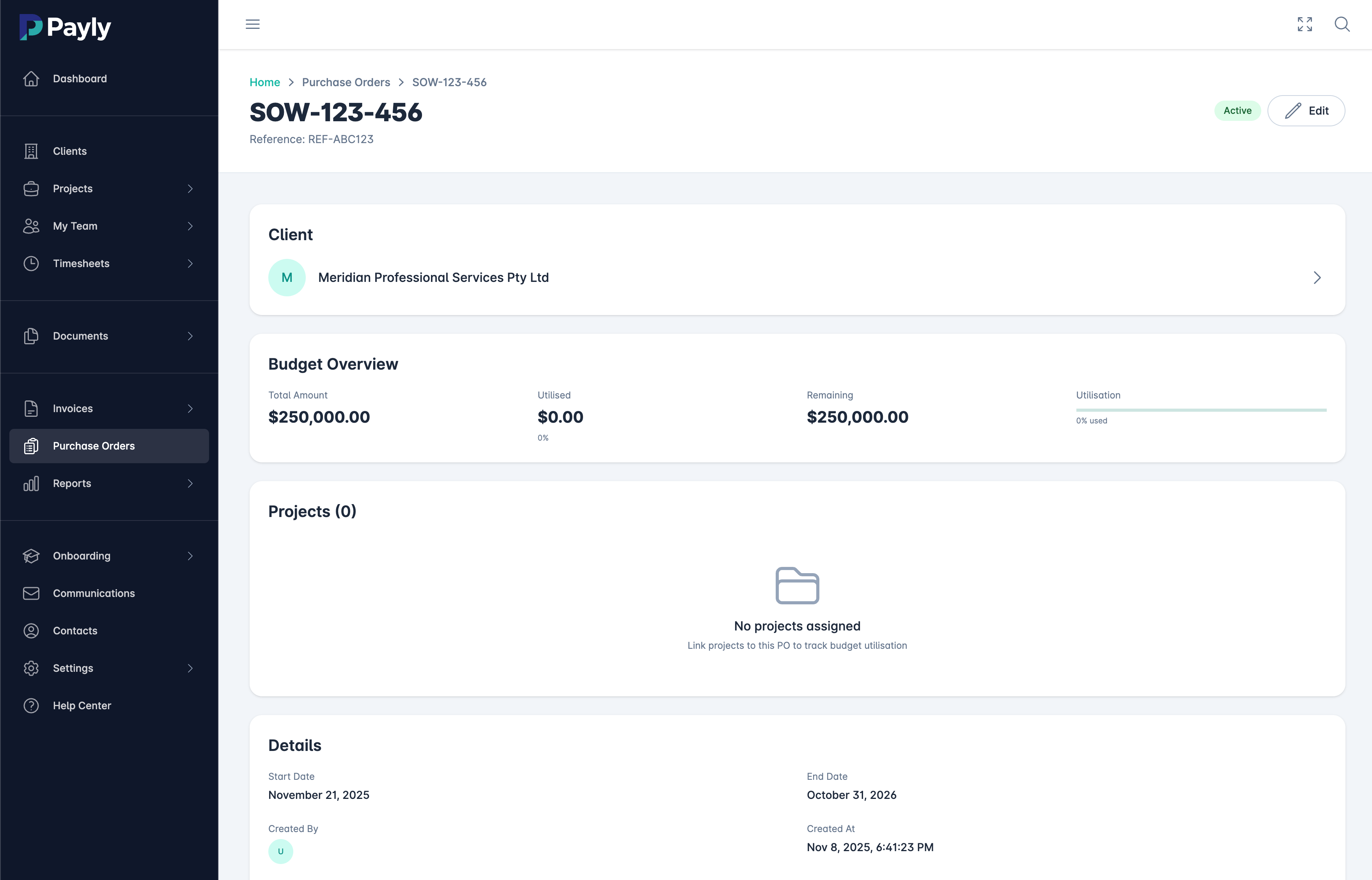
What is Purchase Order Software?
Purchase order software is a digital system for creating, sending, tracking, and managing purchase orders (POs) throughout your procurement process. Instead of manually creating purchase orders in Word or Excel, sending them via email, and tracking approvals in spreadsheets, purchase order software automates the entire workflow from requisition to approval to vendor delivery.
For Australian agencies, consultancies, and growing businesses, purchase order management is essential for controlling costs and maintaining budget visibility. When team members need to purchase software subscriptions, equipment, contractors, or services, a proper purchase order system ensures purchases are approved before they happen, budgets are respected, and all spending is tracked and documented.
Payly's purchase order software is designed for service businesses that need spend control without enterprise complexity. Create professional purchase orders in seconds, set up multi-level approval workflows, track spending against budgets in real-time, and maintain complete vendor records. Every purchase order automatically links to your clients and projects, giving you true visibility into where money is being spent.
The best purchase order systems integrate seamlessly with your existing operations. With Payly, purchase orders connect to your invoicing (for client pass-through costs), document management (for vendor contracts and receipts), and reporting (for budget analysis). This integration means you always know what's been approved, what's been received, and how much budget remains - without manual spreadsheet updates or email searches.
Everything You Need for Purchase Order Management
Professional procurement features without the enterprise price tag
Quick PO Creation
Create professional purchase orders in under 60 seconds. Pre-filled vendor information, line item templates, and automatic numbering streamline the process.
Approval Workflows
Set up multi-level approval chains based on purchase amount, category, or department. Automatic routing ensures the right people approve before orders are sent.
Budget Tracking
Set budgets by client, project, department, or category. Real-time tracking shows remaining budget and prevents overspending before it happens.
Vendor Management
Maintain complete vendor database with contact details, payment terms, delivery addresses, and purchase history. Quick vendor lookup speeds up PO creation.
Automatic Notifications
Team members receive instant notifications when POs need approval, are approved, or are rejected. Vendors get professional PO emails automatically.
Three-Way Matching
Match purchase orders against vendor invoices and delivery receipts. Catch pricing discrepancies and missing deliveries before payment.
Spending Reports
Comprehensive reporting shows spending by vendor, category, project, department, or time period. Export data for accounting and budget planning.
Document Attachments
Attach quotes, specifications, contracts, and supporting documents to purchase orders. All documentation stays organised and accessible.
Client Pass-Through
Mark POs as client billable for automatic inclusion on client invoices. Track which costs should be passed through and ensure nothing is forgotten.
Reduce Procurement Costs by 15%
Businesses that implement purchase order systems typically see 10-20% cost savings through better budget control, reduced maverick spending, and improved vendor negotiations. Here's what proper PO management delivers:
Cost Savings Example
From Request to Delivery in 4 Steps
Streamlined procurement workflow
Create PO
Team member creates purchase order with vendor details, line items, delivery address, and budget allocation.
Get Approval
PO automatically routes to approvers based on amount and category. Instant notifications speed up decision making.
Send to Vendor
Once approved, professional PO automatically emails to vendor. Track delivery status and expected arrival date.
Match & Record
Match vendor invoice against PO, mark as received, and record in spending reports. Complete audit trail.
Perfect for Every Type of Purchase
From software to contractors to equipment
Software & Subscriptions
Track and approve recurring software costs, tool subscriptions, and SaaS purchases. Prevent duplicate subscriptions and identify cost savings opportunities.
Contractors & Freelancers
Create POs for contractor work, freelance services, and external consultants. Ensure all external spend is approved and tracked against project budgets.
Equipment & Hardware
Manage purchases of computers, monitors, office furniture, and other equipment. Track asset ownership and maintain purchase records for depreciation.
Marketing & Advertising
Control marketing spend on ads, creative services, printing, and campaign costs. Allocate to specific campaigns and track ROI against spending.
Office Supplies
Streamline ordering of office supplies, stationery, and consumables. Consolidate vendors to negotiate better pricing and reduce admin work.
Client Pass-Through Costs
Track purchases that will be billed to clients. Automatically include on client invoices with proper markup and ensure nothing falls through the cracks.
Purchase Order FAQs
Common questions about Payly's purchase order features
Why do I need purchase order software?
Purchase order software gives you control over business spending before it happens. Instead of discovering unauthorized purchases on credit card statements, POs require approval first. This prevents budget overruns, eliminates maverick spending, and provides complete visibility into where money is being spent. For businesses spending $200K+ annually on vendors and contractors, PO systems typically save 10-20% through better control.
How do approval workflows work?
You define approval rules based on purchase amount, category, department, or project. For example, purchases under $500 might auto-approve, $500-2000 require manager approval, and $2000+ require director approval. When a PO is created, it automatically routes to the right approvers and sends notifications. Approvers can approve or reject with one click from email or dashboard.
Can I track spending against budgets?
Yes. Set budgets for clients, projects, departments, or spending categories. Payly tracks every PO against the relevant budget and shows remaining balance in real-time. You can set alerts when budgets reach 75% or 90% utilization, and optionally block POs that would exceed budget limits.
How does three-way matching work?
Three-way matching compares the purchase order, vendor invoice, and delivery receipt to ensure they match. This catches pricing errors (vendor charged more than quoted), quantity discrepancies (ordered 10, received 8), or missing deliveries. When discrepancies are found, you can hold payment and resolve with the vendor before paying.
Can POs be linked to client projects for billing?
Absolutely. Mark any PO as "client billable" and allocate it to a specific client project. These costs automatically appear on client invoices with your configured markup. This ensures you never forget to bill clients for approved expenses like contractor fees, software licenses, or third-party services purchased on their behalf.
How do vendors receive purchase orders?
Once a PO is approved, Payly automatically emails a professional PDF purchase order to the vendor. The PDF includes all line items, pricing, delivery address, payment terms, and PO number. Vendors receive it instantly and can reference the PO number when invoicing or shipping.
What reports can I generate for purchase orders?
Payly provides comprehensive PO reporting including: spending by vendor, spending by category, spending by project/client, spending by time period, budget utilization, pending approvals, outstanding POs awaiting delivery, and vendor performance. Export any report to Excel or PDF for further analysis or accounting purposes.
Is there a limit on purchase orders?
No. Payly includes unlimited purchase orders in all plans. Create as many POs as you need each month with no additional fees or transaction charges. Whether you create 10 or 1,000 purchase orders monthly, the price stays the same.
Take Control of Your Business Spending
Start saving 15% on procurement costs with smart purchase order management. Get approval workflows, budget tracking, and spending visibility today.
14-day free trial • Unlimited purchase orders • No credit card required