
Discover accounting software comparison australia: Xero, MYOB & QuickBooks
Explore accounting software comparison australia and see how Xero, MYOB, and QuickBooks stack up for your service business.
Payly Team
February 20, 2026
Picking the right financial software is a cornerstone decision for any Australian freelancer, agency, or service business. This guide dives into a practical accounting software comparison for Australia, putting market leaders like Xero, MYOB, and QuickBooks head-to-head.
Choosing the Right Financial Software for Your Business
This choice goes far beyond just balancing the books. The system you select directly impacts your cash flow management, tax compliance, and how efficiently your business runs day-to-day. A common trap for growing businesses is juggling and paying for multiple subscriptions for separate tasks like time tracking, invoicing, and contract management. This disconnected approach almost always leads to data silos and a mountain of admin work.
This guide provides a clear, practical analysis to help you find a cohesive solution for your business operations. We'll explore the core functions of these standalone accounting platforms and introduce the benefits of systems that integrate everything from the start. Our goal is to give you the insights you need to make a smart decision that saves you both time and money.
The right software isn’t just about managing numbers; it’s about creating a seamless workflow from the first billable hour to the final paid invoice. Choosing a platform that aligns with your operational needs is as crucial as its accounting features.
To make an informed decision and find the best fit for your specific operations, a comprehensive accounting software comparison is a must. Really understanding the subtle differences between platforms helps you avoid costly mistakes down the line. For a deeper look into local options, you can also learn more about how to choose the right small business accounting software in Australia in our detailed guide.
Key Platforms at a Glance
Before we get into the nitty-gritty, here’s a quick overview of the main players we'll be discussing. Each has carved out a distinct role in the Australian business landscape.
| Software | Primary Function | Best For | Core Strength |
|---|---|---|---|
| Xero | Cloud Accounting | Most small to medium businesses | Extensive app marketplace and accountant preference |
| MYOB | Accounting & Payroll | Established businesses with complex needs | Deep Australian tax and compliance integration |
| QuickBooks | Cloud Accounting | Small businesses and freelancers | Strong mobile app and automated workflows |
| Payly | Business Operations | Service-based businesses and agencies | All-in-one time tracking, invoicing, and e-signatures |
The Australian Accounting Software Landscape
When you're trying to choose the right accounting software in Australia, it really helps to understand the key players in the market first. The scene is largely dominated by three major platforms, each with its own backstory, core strengths, and a dedicated following. Getting a handle on what they offer is the best starting point for figuring out what your business actually needs.
First up is Xero, the cloud-native platform that’s become a massive hit with modern small-to-medium businesses and their accountants. Its clean design and enormous ecosystem of third-party apps make it incredibly adaptable. For many, Xero is the go-to choice because it’s easy to use and connects seamlessly with all the other tools they rely on to run their business.
Then you have MYOB, a true veteran of the Australian market. It's built a solid reputation over decades, largely thanks to its deep understanding of local tax and payroll rules. You'll find many established professional services firms still swear by MYOB, especially when dealing with complex payroll. They've made a successful leap from desktop software to a robust cloud platform, holding onto their loyal user base while evolving for today's world.
The Major Players and Their Market Share
The rivalry between these platforms is intense, and you can see it clearly in their online presence. In the Australian market, Xero, MYOB, and QuickBooks are the names you'll see everywhere. Recent data shows Xero leads the pack with a commanding 50.19% of click share. MYOB isn't far behind at 32.46%, and QuickBooks holds a respectable 8.55%, often appealing to businesses looking for a strong global feature set fine-tuned for Australia. If you're interested in the nitty-gritty, you can find more details in this industry report on the Australian accounting software market.
This breakdown really shows how each platform has carved out its own space. Xero's lead is a direct result of its early jump into cloud technology and its strong relationships with accountants and bookkeepers. MYOB’s strong position comes from its deep roots in Australian business compliance, while QuickBooks remains a powerful global player with a solid local footing.
The best accounting software is more than just a ledger; it's the financial engine of your business. The choice between Xero, MYOB, and QuickBooks often comes down to your business's age, complexity, and operational priorities.
For businesses looking to dig even deeper into the competitive landscape, exploring a direct comparison of Odoo, Xero, and MYOB can offer some incredibly valuable insights.
To give you a quick snapshot, here’s how the big names stack up at a glance.
High-Level Accounting Software Overview for Australian Businesses
| Software | Best For | Core Function | Australian-Specific Features | Pricing Model |
|---|---|---|---|---|
| Xero | Modern SMEs, startups, and service-based businesses seeking flexibility and a user-friendly interface. | Cloud accounting with a vast app ecosystem. | BAS reporting, STP payroll, bank feeds for all major AU banks. | Subscription (tiered plans) |
| MYOB | Established businesses, professional services, and companies with complex payroll needs. | Robust accounting with deep compliance features. | STP Phase 2, detailed job costing, strong ATO integration. | Subscription (tiered plans) |
| QuickBooks | Small businesses and sole traders who value global features and strong mobile access. | All-in-one accounting with a focus on ease of use. | BAS lodgement, GST tracking, TPAR preparation. | Subscription (tiered plans) |
This table provides a high-level view, but the right choice always depends on the specific, day-to-day realities of running your business.
Where Operational Platforms Fit In
Beyond these core accounting systems, another type of tool is making waves: platforms that handle the daily operations before the numbers even hit your ledger. Tools like Payly are designed to smooth out workflows like time tracking, client invoicing, and getting contracts signed electronically.
These platforms aren't trying to replace your main accounting software. Think of them as the operational front-end. They make sure every billable hour and expense is captured accurately right from the start, before that data is pushed over to Xero or MYOB.
This solves a huge headache for service businesses, where clunky, separate systems for time tracking and invoicing often lead to admin nightmares and lost revenue. By bringing these tasks together, you create a smooth journey from client work to a paid invoice, which makes the final accounting reconciliation a whole lot cleaner.
Getting Into the Nitty-Gritty: Features for Australian Service Businesses
For any Australian service business, the right software has to do a lot more than just balance the books. Your daily grind is all about tracking billable hours, managing project costs, and getting invoices out the door that are accurate, professional, and compliant with GST and BAS.
This is where we need to look past the marketing slogans and dig into the features that actually make a difference to your bottom line. We'll break down how the major platforms handle the essentials: invoicing, time tracking, and expense management, from the perspective of a busy agency or consultancy. It's not about if a feature exists, but how seamlessly it fits into your workflow, from a tracked hour all the way to a paid invoice.
Invoicing and Getting Paid
Let's start with the most critical part: turning your hard work into cash. Generating a professional invoice and making it easy for clients to pay you is fundamental. While all the big names handle this, the experience can be worlds apart.
Xero is a crowd favourite for a reason. Its invoice templates are flexible and look great, and the automated payment reminders are a godsend for chasing up late payers without having to be the "bad guy". It also plays nicely with payment gateways like Stripe and PayPal, so clients can pay you with a click.
MYOB holds its own with powerful invoicing features, especially for businesses that use retainers. Its ability to generate recurring invoices and detailed statements is a real strength. Plus, its direct links with local Aussie payment services give it a bit of a home-ground advantage.
Then there's QuickBooks Online, which has a fantastic mobile app for invoicing on the run. I particularly like its "smart" invoicing that tells you when a client has viewed your bill, which is surprisingly useful when you’re figuring out who to follow up with.
The real game-changer isn't just creating an invoice. It's the automation that happens around it. The best systems chase payments for you, make it dead simple for clients to pay, and give you a clear picture of who owes you what, all without you lifting a finger.
But here’s a common frustration with these platforms: the disconnect between the work you do and the invoice you send. You might track all your team’s hours in one app, then have to manually punch those numbers into Xero. It’s a recipe for mistakes and wasted admin time. This is exactly where integrated tools like Payly shine, by letting timesheet data flow directly into your invoices, guaranteeing every billable minute is captured.
Time and Expense Tracking
If you're a consultant, run an agency, or work as a freelancer, your time is your inventory. Tracking it accurately is non-negotiable, but it’s often a major headache with standard accounting software.
Xero has a basic time tracking feature called Xero Projects, which is fine for simple job costing. But for anything more complex, you'll almost certainly find yourself browsing the Xero App Store for a dedicated timesheeting add-on. That means another monthly subscription and another piece of tech to manage.
QuickBooks actually has more capable time tracking built-in. It lets your team log hours against specific clients and projects, which is a solid starting point for linking time directly to billing without needing an extra tool straight away.
MYOB also includes job costing and time billing, particularly in its higher-tier plans like AccountRight. These features are quite powerful, but they can feel a bit clunky to set up and are often better suited to larger firms with an in-house bookkeeper.
A Day in the Life of an Aussie Agency
Picture a small digital marketing agency. You have five consultants juggling work across three different client accounts. Each person needs to track their time against specific tasks.
- The "Stitched-Together" Way: The team logs hours in a tool like Harvest. At month's end, the office manager spends hours exporting spreadsheets, trying to piece the data together, and then manually creating invoices in Xero. It's slow, and one copy-paste error could cost you.
- The Integrated Way: Each consultant tracks time in one unified system. That data automatically flows into pre-approved timesheets, which then populate draft invoices for each client. The manager just has to review and click "send". This slashes admin time, eliminates errors, and you get paid faster.
Keeping on top of client-related expenses is just as crucial. For a deeper look at how to get this right in a mainstream platform, have a read of our guide on managing expenses in Xero. It really shows why having a bulletproof system for capturing and allocating costs is so important.
Connecting Your Workflow and Projects
Your accounting software handles the money, but your project management tools are where the work actually happens. How well these two worlds connect can make or break your efficiency.
This is where Xero's massive ecosystem of over 1,000 third-party apps is a huge advantage. You can connect it to almost anything, from Asana to Trello, often using a bridging service like Zapier. It’s incredibly flexible, but be warned: this can quickly lead to a tangled web of subscriptions and a surprisingly high monthly bill.
MYOB and QuickBooks have their own app marketplaces, but they just aren't as extensive as Xero's in Australia. They’ll connect to the big-name CRM and project management platforms, but you might struggle to find integrations for more specialised tools.
This brings up a different way of thinking. Instead of trying to bolt different systems together, some platforms are designed to manage the whole process from start to finish. A tool that handles the project brief, time tracking, client agreements, and invoicing all in one place gets rid of the integration nightmare entirely. It gives you a single, reliable source of truth for the entire project lifecycle, from the first pitch to the final payment.
The True Cost of Your Business Software Stack
When you’re comparing accounting software in Australia, it’s easy to get fixated on the monthly subscription price. But that advertised fee is just the tip of the iceberg. For most agencies and service businesses, the real expense is hiding in the collection of add-on tools you need just to run your day-to-day operations.
This collection of separate apps is often called a "software stack," and it can quickly become a major line item on your P&L. Think about it: you start with your main accounting platform, then you add a separate subscription for time tracking, another for e-signatures, and maybe one more for secure document management. Each one has its own monthly bill, and before you know it, the costs have quietly ballooned.
This patchwork approach doesn't just hit your wallet; it creates a lot of operational friction. Your team ends up constantly jumping between different apps, manually shifting data from one to another, and juggling multiple logins. It’s a huge time-sink, time that could be spent on billable work instead of wrestling with admin.
Deconstructing the Software Stack
Let’s get practical and break down the individual costs for a hypothetical five-person Australian agency. This shows just how quickly separate subscriptions for essential tools can add up, giving you a much clearer picture of your total monthly software spend.
- Core Accounting: Your foundation is a platform like Xero, MYOB, or QuickBooks. Depending on the features you need, you're likely looking at $60 to $150 per month.
- Time Tracking: For accurate project billing, a dedicated tool is almost non-negotiable. Something like Harvest or Toggl will add another $60 per month for a team of five.
- E-Signatures: Getting client agreements and contracts signed requires a solution like DocuSign. That can easily add another $75 per month to your outgoings.
- Document Management: If you need to store and share client files securely, a business plan from a provider like Dropbox is often the go-to, costing around $25 per month.
On their own, these costs might seem manageable. But when you add them all together, they create a pretty hefty monthly bill. For any business owner trying to keep a tight rein on the budget, understanding this cumulative effect is crucial.
The Rising Importance of Efficient Billing
Getting these processes streamlined is becoming more critical than ever. The Australian billing software market, which is vital for service-based businesses, is forecast to hit AUD 525.04 million by 2035. This massive growth is being driven by a clear need to cut down on billing errors and get paid faster, a major headache for countless businesses. You can discover more insights about this growing market to see the full picture.
The true cost isn't just the sum of your subscriptions; it's the operational drag and lost revenue from disconnected systems. An integrated platform can cut both direct software costs and the hidden expense of administrative inefficiency.
This trend really highlights why consolidating functions is such a smart move. An all-in-one platform that combines timesheets, PDF e-signatures with audit trails, and invoicing can replace an expensive stack like QuickBooks plus DocuSign. And with account-based pricing, this integration can lead to serious savings, potentially slashing your costs by as much as 95%.
Cost Comparison: The Software Stack vs. an All-in-One Platform
To make this crystal clear, let's put the numbers side-by-side. The table below lays out an estimated monthly cost breakdown for our five-person agency, comparing a typical software stack against an integrated platform like Payly.
| Software/Service | Typical Monthly Cost (Stacked Model) | Payly (Integrated Model) |
|---|---|---|
| Core Accounting (e.g., Xero Starter) | $65 | (Integrates with your existing plan) |
| Time Tracking (e.g., Harvest) | $60 | Included |
| E-Signatures (e.g., DocuSign) | $75 | Included |
| Document Management | $25 | Included |
| Estimated Total Monthly Cost | $225 | Starts from $49 |
As you can see, the financial benefit of ditching a collection of separate tools is undeniable. By opting for an integrated solution, you’re not just simplifying your team's workflow, you’re also making immediate and significant savings. That’s capital you can put straight back into growing your business.
Which Software Actually Fits Your Business?
Choosing the right platform isn't about picking a clear winner in some abstract accounting software race. It's about matching the tool to the job. The best setup for a solo freelance consultant is worlds away from what an established professional services firm needs to run smoothly.
Let's move past the feature lists and dive into how these tools work in the real world. We'll look at specific business types and break down which software, or combination of tools, makes the most sense. This way, you can see how these platforms perform in a business just like yours.
For the Freelance Consultant or Sole Trader
When you're a freelancer, efficiency and cash flow are everything. You need to invoice accurately, track your time without fuss, and manage expenses without drowning in admin. The goal is a system that helps you get paid faster with the least amount of effort.
This is where an integrated platform can be a lifesaver. Think about it: you track your billable hours, and that data flows straight into a professional invoice. Before sending it off, you attach your client agreement for an e-signature and send it all in one go. This completely sidesteps the classic freelancer trap of juggling a timesheet app, a separate invoicing tool, and yet another subscription for e-signatures.
- Best Fit: A unified platform like Payly is a natural choice here, as it rolls time tracking, invoicing, and e-signatures into one package. For your year-end tax, it can sync directly with a basic Xero or QuickBooks plan, giving your accountant precisely what they need without you having to wrestle with a full-blown accounting system day-to-day.
For the Growing Digital or Creative Agency
As an agency scales, so does its complexity. Suddenly you're managing a team, juggling multiple client projects, and navigating a more complicated payroll. While sharp invoicing is still vital, you now need tools that help the team collaborate and give you a clear view of which projects are actually making money.
This is the point where a dedicated accounting platform like Xero becomes the financial heart of your operation. Its real power lies in its huge app marketplace, letting you plug in project management tools like Asana or your CRM. The catch? This can lead you right back to the 'software stack' problem, where you're paying for several subscriptions that don't always communicate perfectly.
- Best Fit: A hybrid approach works wonders here. Use Xero as your central accounting ledger for its brilliant bank reconciliation and BAS reporting. Then, pair it with an operational platform to handle the front-end chaos: team-wide time tracking, client approvals, and multi-stage invoicing. This keeps your core accounting clean while making daily operations much smoother.
The smartest setup for an agency isn't about finding one tool to do everything. It’s about building a connected ecosystem where an operational platform handles the day-to-day grind, and your accounting software manages the big-picture financials.
For the Established Professional Services Firm
An established firm, think a law practice or an engineering consultancy, has a different set of, often stricter, requirements. You’re likely dealing with complex payroll involving various awards, detailed job costing, and specific compliance hurdles. Rock-solid security and deep integration with Australian tax systems are completely non-negotiable.
For these kinds of businesses, MYOB has long been a heavyweight contender. Its deep roots in Australian compliance and its powerful payroll features make it a reliable choice for managing the financial nuts and bolts of a larger, more structured organisation. The whole system is built to handle the kind of detailed reporting and multi-layered financial management that established firms depend on.
But even a robust system like MYOB can be made better. While it nails the core accounting, its tools for client onboarding or signing documents might not feel as modern or user-friendly as more specialised solutions.
- Best Fit: MYOB often serves as the powerful accounting engine. You can pair this effectively with a separate platform built for seamless client onboarding and secure document signing. This combination lets the firm lean on MYOB’s compliance strengths while giving clients a modern, slick experience for contracts and agreements. It's truly the best of both worlds.
Beyond the Books: Streamlining Your Entire Operation
The way we talk about accounting software in Australia is changing. It's no longer just about balancing the books and lodging your BAS. Savvy businesses are now looking for a single, unified platform that can run their entire workflow, from the moment a project kicks off to the day the final payment lands in the bank.
This shift is a direct response to a real-world headache: "app-switching fatigue." We've all been there, bouncing between different tools for timesheets, project management, contracts, and invoicing. It’s a huge time-waster and a recipe for mistakes.
The real goal here is to create a single source of truth for your business. Imagine your time tracking, project invoicing, and client contracts all living happily in one system. The efficiency boost is massive. Data just flows where it needs to, cutting out the manual double-entry that so often leads to costly errors. This kind of integration is what truly organises your operations, not just your financials.
The Power of a Single Cloud Platform
Cloud-based systems are the engine driving this operational shift. They give modern Australian businesses the secure, anywhere-anytime access they need to compete and grow. The market numbers back this up: cloud accounting services now command a 43% market share in a sector worth a staggering USD 20.5 billion.
Why the rapid growth? It comes down to real savings, tighter cybersecurity, and incredible flexibility. In fact, when businesses bring their tools and workflows together in the cloud, they often slash internal costs by 40-60%. You can get a deeper look at these market trends in the Australian accounting services market report.
This decision tree gives you a quick visual guide on which software path might be the right fit for your business, whether you're a solo freelancer or a growing agency.
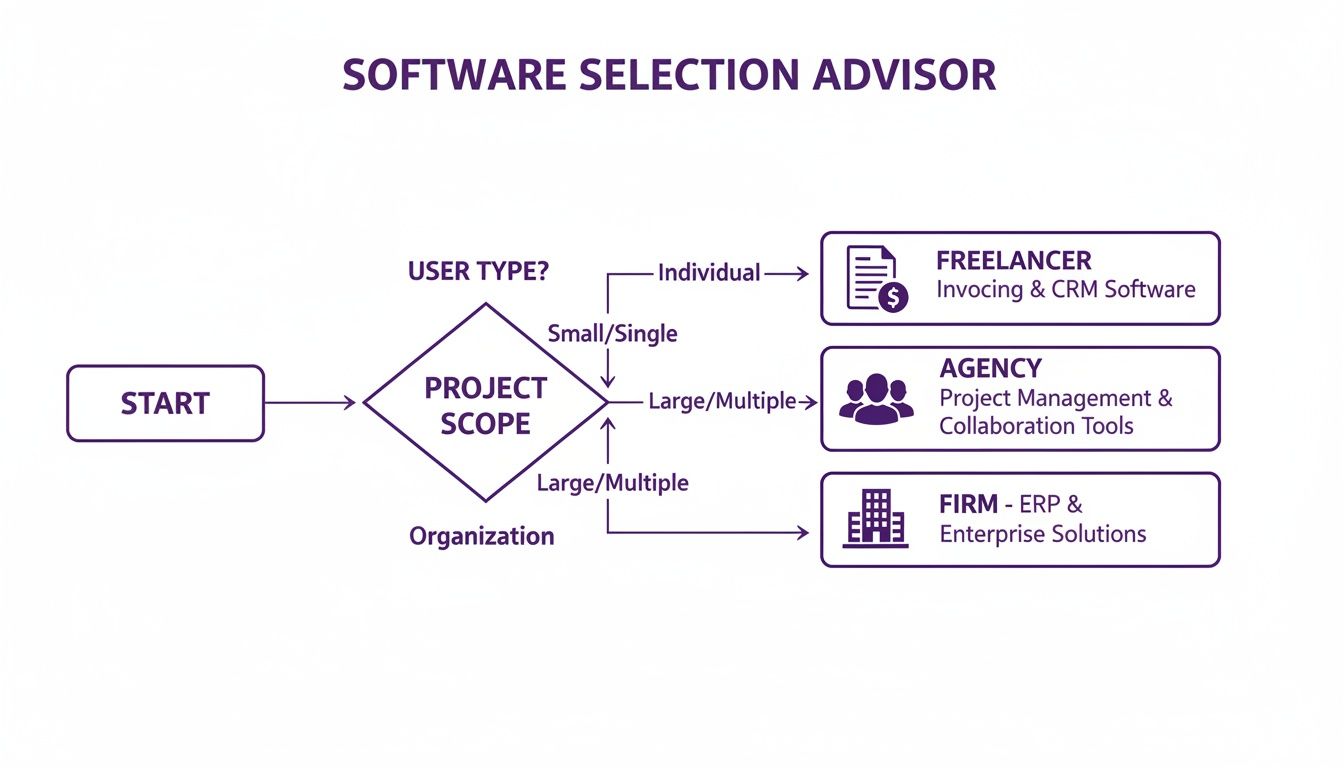
As the flowchart shows, the more complex your business gets, the more you need integrated tools to keep things running smoothly.
A truly unified platform doesn't just connect different functions; it automates them. Picture this: an approved timesheet automatically creates a draft invoice, which is then sent to the client with the contract attached for an e-signature. That’s the kind of smart integration that guarantees accuracy and seriously speeds up your payment cycle. If this sounds like what you need, it's worth exploring the world of professional services automation software.
The ultimate aim is to create a frictionless path from work completed to cash in the bank. Modern businesses prosper when their operational and financial systems are perfectly aligned, eliminating administrative bottlenecks and freeing up teams to focus on client value.
Got Questions? We've Got Answers
Choosing the right software can feel like a massive decision, and it's normal to have a few lingering questions. Let's tackle some of the most common ones we hear from Australian businesses trying to lock in their choice.
Can I Actually Move My Old Data Across?
Yes, you absolutely can. Moving your financial history from an old system is a well-trodden path. Xero, MYOB, and QuickBooks all have built-in tools and step-by-step guides to help you pull across essential data like your chart of accounts, customer details, and unpaid invoices from other programs or even spreadsheets.
A word of advice though: the smoother the migration, the cleaner your data was to begin with. It’s well worth taking the time to tidy up your records before you start. If your setup is particularly complex, bringing in a certified advisor to handle the move can be a real game-changer.
What's the Deal with Single Touch Payroll (STP)?
Single Touch Payroll (STP) is a reporting system from the Australian Taxation Office (ATO). It basically means that instead of sending a big report at the end of the year, you now report your employees' tax and super details to the ATO every single time you do a pay run.
The good news is that all the big players (Xero, MYOB, and QuickBooks) have this completely sorted. Their payroll functions are built to handle STP automatically. Once you process your payroll, the software sends the necessary info straight to the ATO, keeping you compliant without any extra headaches.
Will These Platforms Talk to My Other Tools?
They sure will. This is where modern, cloud-based software really shines. Xero, in particular, is legendary for its massive app marketplace, boasting over 1,000 third-party integrations. It can connect to just about anything you can think of, from your CRM to your job management software.
QuickBooks and MYOB have strong app stores too, even if they aren't quite as vast as Xero's in the Australian market. This connectivity is crucial because it lets you build a tech ecosystem that works for your business, letting data flow seamlessly and saving you from endless double-entry.
When you're comparing accounting software in Australia, don't just look at the features list. Check how well it plays with the other tools you already use every day. Getting this right saves a phenomenal amount of time and cuts down on human error.
How Safe is My Financial Data in the Cloud?
Security is non-negotiable for these companies. Reputable cloud accounting platforms protect your sensitive financial information with the same level of security your bank uses.
Here's what that typically looks like:
- Data Encryption: Your information is scrambled both while it's travelling across the internet and when it's sitting on their servers.
- Regular Backups: They automatically back up your data across multiple secure locations, so you're covered if something goes wrong.
- Controlled Access: You get to decide exactly who sees what. User permissions let you grant or restrict access to sensitive financial data.
Tired of juggling different subscriptions just to get paid? Payly brings time tracking, invoicing, and e-signatures together in one straightforward platform built for Australian businesses. Start your free 14-day trial today and see how much time you can save.
Payly Team
Sharing insights and strategies to help service businesses thrive. Follow Payly for more tips on time tracking, invoicing, and business operations.
Related Articles
Ready to streamline your business?
Join thousands of freelancers and agencies who use Payly to track time, send invoices, and get paid faster.