
How to Digitally Sign PDF: how to digitally sign pdf on any device
Learn how to digitally sign pdf quickly and securely. Our guide covers legally binding e-signatures for Australian businesses on any device.
Payly Team
January 11, 2026
The easiest way to get started with digitally signing a PDF is often with free tools you already have, like Adobe Acrobat Reader or the built-in Preview app on a Mac. You can simply add a saved image of your signature or even draw one directly onto the document. It’s a great way to turn a tedious task into a quick, paperless process.
This simple method is perfect for finalising proposals, contracts, and client agreements without ever needing to touch a printer.
The Modern Way to Finalise Agreements in Australia
Let's be honest, the old print-sign-scan routine is on its last legs for Australian businesses. What once required a clunky printer and piles of paper can now be done with a few simple clicks. Learning how to digitally sign a PDF is no longer a niche skill for the tech-savvy; it's a fundamental part of running a modern business.
For any freelancer, agency, or service-based business, this isn't just about convenience. It’s about being professional, getting paid faster, and keeping your clients happy. When you can send off a contract and get it back signed in minutes, you shorten your sales cycle and can start delivering value sooner.
Why Digital is the New Standard
The move to digital document workflows has quickly become the norm in Australia, thanks to widespread internet and mobile access. This isn't just a passing trend; it's a massive economic shift. The Australian digital signature market, valued at USD 306.5 million in 2025, is expected to skyrocket to USD 3.34 billion by 2034. That explosive growth tells you everything you need to know: nearly every client you work with can sign a document on their phone or computer. You can read more about the growth of the Australian digital signature market to see just how big this is.
Adopting a secure, digital way to finalise documents brings some serious advantages:
- Speed and Efficiency: Get agreements signed in minutes, not days. No more delays from printing, posting, or manually chasing people up.
- Better Security: A true digital signature isn't just a picture of your name. It contains encrypted information that verifies who signed it and confirms the document hasn't been tampered with since.
- Legal Weight: In Australia, digital signatures are legally recognised under the Electronic Transactions Acts, giving them the same legal standing as a handwritten signature.
- A Professional Touch: A smooth, paperless signing process shows your clients you're organised, modern, and that you respect their time.
A streamlined digital signing process is a critical tool for any modern Australian business. It not only saves time and reduces administrative headaches but also builds client confidence by showing you value efficiency and security.
Digital Signature Methods at a Glance
Not all digital signatures are created equal. Depending on your needs, from a quick internal approval to a high-stakes legal contract, different methods offer varying levels of security and convenience. Here’s a quick breakdown to help you choose the right path.
| Method | Best For | Security Level | Legality in Australia |
|---|---|---|---|
| Image of Signature | Casual agreements, internal approvals, low-risk documents. | Low – easy to copy, no audit trail. | May be accepted but can be difficult to prove identity. |
| Built-in PDF Software | Most standard business contracts, proposals, and service agreements. | Medium – often includes a timestamp and basic verification. | Generally recognised as valid under the Electronic Transactions Acts. |
| Dedicated e-Sign Tool | High-value contracts, legal documents, and when a full audit trail is needed. | High – includes cryptographic verification, multi-factor authentication, and a detailed audit log. | Fully compliant and legally enforceable, providing the strongest evidence. |
For everyday business, built-in tools are often enough. But when you need absolute certainty and a bulletproof audit trail, a dedicated e-signature platform is the way to go.
How It Actually Transforms Your Workflow
Think about onboarding a new client. Instead of attaching a PDF to an email and hoping they have a printer handy, you send them a secure link. They open it on their phone, sign with their finger, and you both get an email with the legally binding, finalised copy a moment later.
This isn't some futuristic fantasy; it's a standard feature in many modern business tools. Integrated platforms can automate this entire workflow, from generating a proposal to getting it signed and then automatically converting it into an invoice. This stops the administrative drain of juggling documents across different apps and lets you keep your focus where it belongs: on delivering great work for your clients.
Digital Signatures vs. Electronic Signatures: What's the Real Difference?
Before we jump into how to digitally sign a PDF, we need to clear up something that trips up a lot of people. You’ll often hear the terms "electronic signature" and "digital signature" used as if they’re the same thing. They're not.
From a legal and security standpoint, they are worlds apart. Understanding this difference is the first, and most important, step to making sure your agreements are secure and enforceable.
An electronic signature, or e-signature, is the big-picture category. It’s really just a digital version of signing your name. It could be your typed name on an email or a scanned image of your John Hancock pasted onto a Word doc. It shows you intended to sign, but that’s about it.
A digital signature, however, is a very specific type of electronic signature. It’s the high-security, heavy-duty version. This one uses powerful cryptographic technology to create a unique, tamper-proof "fingerprint" for the document. It doesn't just show you meant to sign; it also proves who you are and guarantees the document hasn't been touched since.
The Simple Electronic Signature
At its most basic, an e-signature is just an electronic mark. It's incredibly common because it's fast and easy.
- How it works: You might draw your signature with a mouse, upload an image of it, or even just type your name in a specific font.
- Security level: Very low. Let's be honest, these can be easily copied, forged, or slapped onto a different document without anyone noticing.
- Best for: Low-risk, internal documents. Think informal agreements or day-to-day communications where you're not worried about fraud.
Pasting an image of your signature onto a PDF is like putting a sticker with your name on it. It says it's from you, but it doesn't actually seal the document or prove no one has tampered with it.
The Power of a True Digital Signature
This is where things get serious. A digital signature is less of a signature and more of a high-tech security seal. When you apply a digital signature, a unique cryptographic hash, a long, complex string of characters, is generated from the document's content and your personal signing certificate.
This hash is then encrypted with your private key. Anyone who has your corresponding public key can unlock it, and doing so confirms two critical things:
- Authenticity: It proves beyond a doubt that the signature came from you.
- Integrity: It confirms the document hasn't been altered, not by a single comma, since it was signed. If someone tries to change anything, the digital signature breaks, immediately flagging the document as invalid.
Think of a digital signature as the modern equivalent of a notarised wax seal. It doesn't just identify the signer; it provides undeniable proof that the document is exactly as it was at the moment of signing. It creates an unbreakable chain of trust.
This is the kind of security you need for important business. If you want to get into the nitty-gritty of the tech and legal side, our guide on what is a digital signature is a great place to start.
Why This Matters for Australian Businesses
For freelancers and service businesses in Australia, this isn't just a technical detail; it's a critical one. A simple e-signature might be fine for a quick client email, but it won’t cut it for a binding contract, a major proposal, or any kind of financial agreement.
A digital signature provides a verifiable audit trail, which is what really holds up in a legal dispute. Professional platforms that offer this technology log every single action: who signed, precisely when they signed, and from where. This creates a solid, independent record that proves the agreement is valid.
It’s the kind of peace of mind a simple signature image just can't offer. Choosing the right one is all about matching the level of security to the importance of the document.
Getting Started: How to Digitally Sign a PDF on Your Device
So, you understand the critical difference between a simple electronic signature and a genuinely secure digital one. That's the first step. Now, let's get practical. Learning how to digitally sign a PDF is probably easier than you think, and you likely already have the tools you need right on your computer or phone.
Forget about downloading complex software or paying for expensive subscriptions for now. We’re going to walk through the most common, straightforward methods for signing documents on the devices you use every day. You'll be able to finalise that urgent client agreement or supplier contract in minutes.
The visual below does a great job of breaking down the two signature types we've been talking about. It highlights the basic nature of electronic signatures versus the layered security of digital ones.
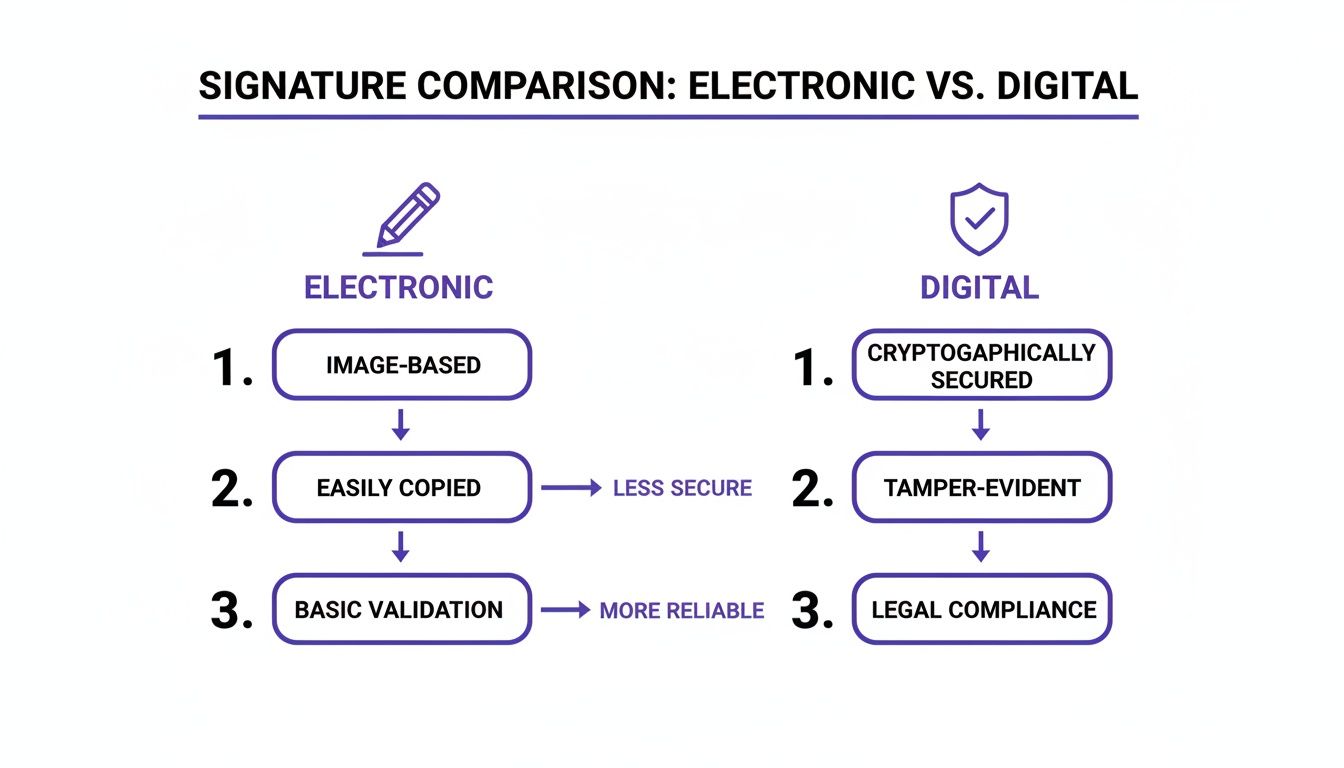
This comparison makes it pretty clear why a proper digital signature, with its built-in security, is always the better choice for any document that really matters to your business.
Signing a PDF on a Windows PC
For most people using a Windows machine, Adobe Acrobat Reader is the go-to for anything PDF-related. It’s free, and it offers a solid, reliable way to add a secure digital signature to your documents.
First things first, you'll need what's called a Digital ID. If you don't already have one, think of it as your digital passport: a secure, encrypted file that proves you are who you say you are. You can create a self-signed one right inside Acrobat Reader, which is perfectly fine for most standard business needs.
Once that Digital ID is set up, the rest is a breeze.
- Open the PDF you need to sign in Adobe Acrobat Reader.
- Find the Fill & Sign tool. It's usually sitting in the right-hand pane, but if not, you'll find it under the Tools menu.
- Click Sign Yourself, and then choose Add Signature. Here, you'll get the option to draw your signature, type it out, or upload an image of it.
- After you've styled the signature's appearance, you can drag it anywhere you need it on the document. The crucial part happens when you save. Acrobat will prompt you to use your Digital ID to certify the signature, creating that secure, tamper-proof link we've been talking about.
This method gives you a really good level of security and is widely accepted for business contracts right here in Australia.
Signing a PDF on macOS with Preview
If you're a Mac user, good news: you've got a surprisingly powerful tool built right into your operating system. The Preview app is much more than a simple document viewer; it has some great signature features baked in.
Creating your signature in Preview is incredibly intuitive. You can use your trackpad to draw it directly, or even hold a piece of paper with your signature on it up to your Mac's camera. Preview just snaps a picture and digitises it for you. It's quite slick.
To add your signature to a document:
- Open up your PDF file in the Preview app.
- Click the Show Markup Toolbar button (it looks like a little pen tip inside a circle).
- From there, click the Sign button and select the signature you've already saved.
- Just drop it onto the document, resize it, and position it where it needs to go.
- Hit save, and you're done.
It's worth noting that while Preview's method is incredibly fast and convenient, it's technically creating an electronic signature, not a full digital one. It's perfectly fine for many situations, but for high-stakes legal or financial documents, you're always safer using a tool that provides a complete cryptographic audit trail.
How to Sign a PDF on Your Mobile Phone
Being able to sign documents on the go is non-negotiable for modern business. Thankfully, both iOS and Android devices have excellent built-in features and free apps to get the job done in a pinch.
On an iPhone or iPad (iOS)
Apple makes signing PDFs incredibly easy with its built-in Markup tool. You can find it right in Mail, the Files app, or even when viewing photos.
- Open the PDF attachment or file on your device.
- Tap the Markup icon, which is that same pen-tip-in-a-circle icon.
- Tap the little plus (+) button in the bottom-right corner and choose Signature.
- You can then draw your signature with your finger or an Apple Pencil, place it on the document, and save.
This is a fantastic way to quickly sign and return something when you're out of the office.
On an Android Device
For Android users, your best bet is usually the free Adobe Acrobat Reader for Mobile app. The process feels very much like the desktop version and gives you a reliable way to create and apply a signature.
- Download and open the Adobe Acrobat Reader app from the Play Store.
- Navigate to the PDF you need to sign.
- Tap the blue pen icon in the bottom right, then select Fill & Sign.
- Tap the signature icon (it looks like a fountain pen) and draw your signature on the screen.
- Place the signature, resize it as needed, and tap the checkmark to apply it.
Once you’ve saved a signature, it's available across your devices, which makes the process even faster next time.
While these tools are great for adding a simple signature, some documents require more structure. For those, you might need to learn how to create editable PDF forms to make sure there are designated fields for signing. And for the tech-savvy who are curious about what’s happening under the hood, exploring Python PDF reader libraries can offer some fascinating insights into how these tools interact with the PDF structure itself.
Choosing the Right E-Signature Tool for Your Business
While the built-in signing tools on your devices are handy for the occasional PDF, they start to show their cracks when your business really depends on them. For Australian freelancers, agencies, and service-based businesses, relying on those basic methods is a bit like using a personal email account for all your client work. It gets the job done, but it’s not professional, secure, or scalable.
When you find yourself sending multiple contracts, needing to track their status, and making sure every signature is legally sound, it’s time to look beyond the free options. This is where a dedicated e-signature platform really changes the game.
The Limits of Free Signing Tools
Don't get me wrong, free built-in tools are great for one-off tasks. The problem is they lack the robust features that truly protect your business and make your life easier.
The biggest drawback is the absence of a comprehensive audit trail. Sure, a tool like Preview can place an image of your signature on a document. But it doesn't create the detailed, cryptographic record you'd need in court to prove who signed it, when they signed, and that the document hasn’t been tampered with since. For any high-value contract, that's a significant risk.
Other common pain points include:
- Minimal Security: Most free tools offer basic protection at best, without advanced features like multi-factor authentication or encrypted storage.
- No Centralised Management: You’re left with no single dashboard to see what’s out for signature, what’s been signed, or who needs a follow-up.
- Lack of Automation: There are no automated reminders to nudge clients who haven't signed, which means you’re stuck chasing them up yourself.
These gaps quickly lead to admin headaches, security vulnerabilities, and potential legal challenges down the line.
What to Look for in a Professional E-Signature Platform
When you decide to upgrade, you’re not just paying for a better way to sign. You're investing in a system that strengthens your agreements and automates a crucial part of your business.
A professional platform provides the security and legal weight that free tools simply can’t offer. For businesses wanting to embed digital signatures deep into their operations, it's also worth exploring broader solutions like legal document automation software for even greater efficiency.
Here are the essentials your business should look for:
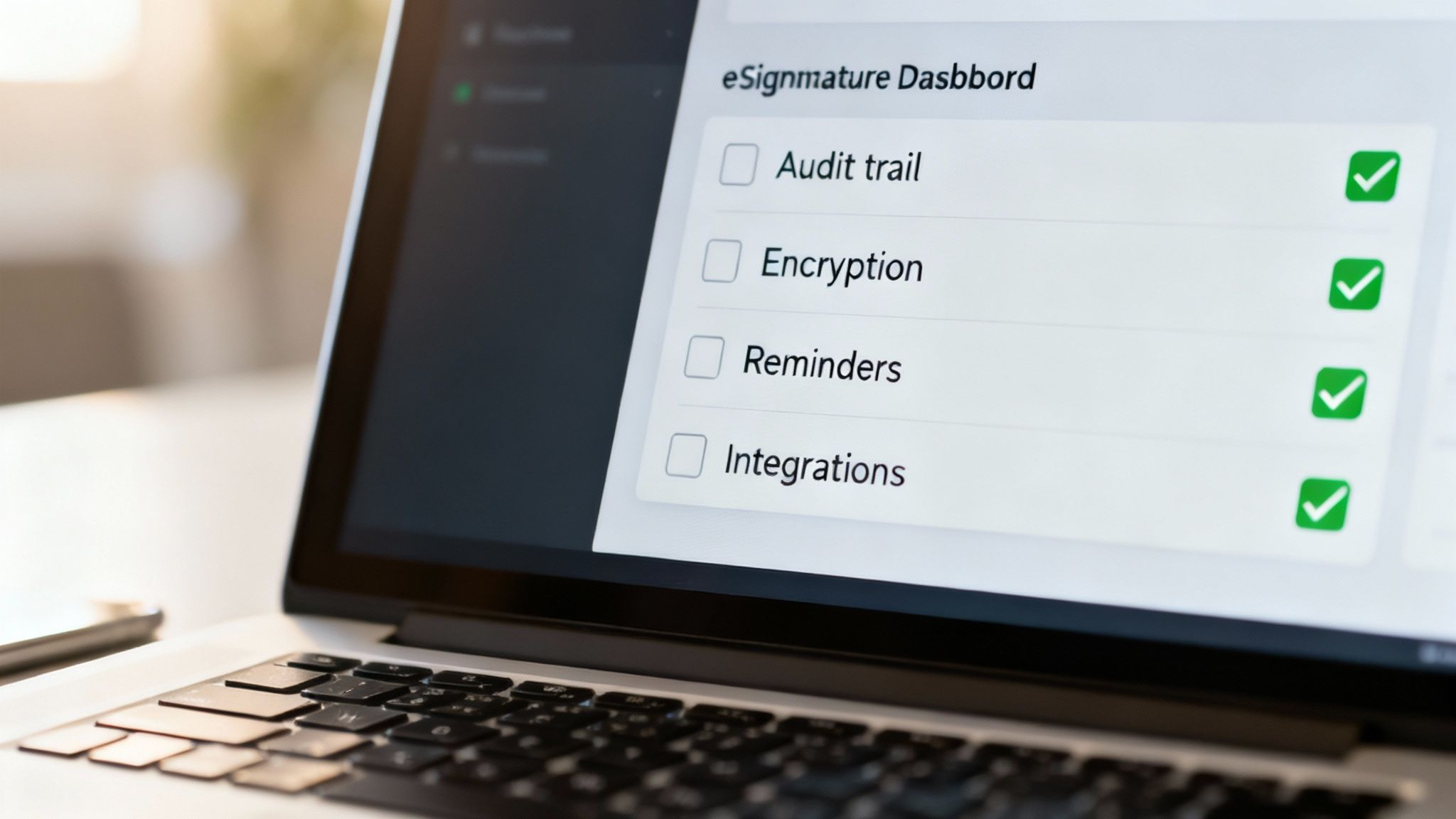
- Cryptographic Audit Trails: This is a non-negotiable. A proper tool will generate a detailed certificate of completion for every signed document, logging IP addresses, timestamps, and every single action taken. This is your irrefutable proof of the signing process.
- Compliance with Australian Standards: The platform must comply with the Electronic Transactions Acts (ETAs) in Australia. This ensures your signatures are legally binding and enforceable here at home.
- Automated Workflows: Look for features like automated reminders, reusable document templates, and real-time status tracking. These tools can save you hours of admin work and help get your agreements finalised faster.
- Bank-Level Security: Your platform should use strong encryption to protect your documents both in transit and at rest, keeping sensitive client information safe from prying eyes.
Choosing a dedicated e-signature platform isn't just about getting a better signature. It's about professionalising your entire agreement process, from sending the first draft to securely archiving the final, legally-binding copy.
The Power of an All-in-One Solution
For many Australian service businesses, the real breakthrough comes from integrating e-signatures into a broader business management tool. Juggling separate apps for time tracking, invoicing, document storage, and signatures is inefficient and costly. An all-in-one platform like Payly brings these functions together under one roof.
Imagine a workflow like this: you track your project hours, convert them into a professional invoice with a click, and attach your service agreement for the client to sign, all within the same system. The client gets one clean email, signs the document digitally, and you both receive a finalised copy with a complete audit trail attached.
This integrated approach brings some serious benefits:
- Reduced Costs: Instead of paying for multiple subscriptions (think DocuSign, Harvest, and Dropbox), you pay for one unified platform.
- Saved Time: You eliminate the manual double-handling of moving information between different apps, reducing errors and freeing you up for actual client work.
- Improved Client Experience: Your clients get a smooth, professional, and consistent journey from the initial proposal right through to payment.
This shift towards digital-first workflows is backed by broader trends in Australia. A Productivity Commission report even recommended moving government reporting away from static PDFs towards more structured digital filing. This signals that when PDFs are used, they’re expected to be part of a fully automated digital process, making integrated signing workflows the new standard. You can read more in the full Productivity Commission report.
Are Digital Signatures Legally Binding in Australia?
Once you’ve figured out how to digitally sign a PDF, the million-dollar question always follows: is it actually legal? For any Australian business owner, this isn't just a technicality; it's the bedrock of every single agreement you finalise.
The good news? Yes, electronic and digital signatures are absolutely recognised and enforceable across Australia.
This isn’t just a modern convention; it’s backed by a solid legal framework. Both Commonwealth and state governments have passed Electronic Transactions Acts (ETAs). In simple terms, these laws confirm that a transaction isn't invalid just because it happened electronically. They pave the way for digital agreements to carry the exact same weight as their old-school, pen-and-paper counterparts.
But there’s a catch. For a digital signature to be legally binding, you can’t just drop a picture of your name onto a page and call it a day. The ETAs lay out specific criteria to ensure the signature is genuine and reliable. Getting your head around these rules is the key to doing business with confidence.
The Core Legal Requirements in Plain English
The language in the ETAs can be pretty dense, but the ideas behind it are refreshingly straightforward. For your digitally signed PDF to stand up in court, you really just need to tick three main boxes.
-
You Know Who Signed It: You need a reliable way to identify the person signing and be sure they meant to sign. A typed name on its own is a bit flimsy. This is precisely where dedicated platforms prove their worth, capturing details like email addresses, IP locations, and timestamps to create an undeniable link to the signer.
-
They Agreed to Sign This Way: The signer must have consented to doing business electronically. This can be explicit, like ticking an "I agree" box, or it can be implied by their actions, like when they willingly follow a link you've sent to an online signing portal.
-
The Document Can't Be Altered: Once signed, the document has to be protected from any sneaky changes. This is that "tamper-proof seal" we talked about earlier. It’s a core feature of a true digital signature that locks the document's content at the moment of signing.
These aren't just suggestions; they're essential. If you want to go deeper into what makes any agreement stick, we've covered the essential elements of a contract in Australia in another guide.
Best Practices for Signatures That Actually Hold Up
Knowing the theory is one thing, but putting it into practice consistently is what matters. To make sure every PDF you send out for signing is compliant and enforceable, it pays to follow a clear set of best practices.
The easiest path is to use a reputable platform that already has these practices built into its DNA. It takes the guesswork out of the equation and gives you a secure, repeatable process for every single document.
The real goal here is to create an undeniable record that proves who signed, what they signed, and that they fully intended to be bound by it. That digital audit trail is your best friend if an agreement is ever questioned.
Think of it as a pre-flight checklist for your signing process:
- Use a Secure Platform: Choose a tool that generates a full, cryptographic audit trail for every signature. This certificate should log every touchpoint, from the moment the document was opened to the final signature.
- Verify the Signer: If the agreement is high-stakes, use features like two-factor authentication (sending a unique code to the signer's phone) to add an extra layer of identity verification.
- Make Intent Obvious: The document and signing workflow should clearly state that by applying their signature, the person is agreeing to be legally bound by the terms inside.
- Distribute Final Copies: Once all parties have signed, everyone should automatically get a final, fully executed copy of the PDF for their records. No chasing required.
- Archive Everything Securely: Keep a well-organised digital archive of all your signed agreements and their corresponding audit trails.
Given Australia’s massive digital uptake, this whole process is smoother than ever. With 97.1% of the population online, asking a client to sign a PDF digitally is now the standard, not the exception. In today's business climate, firing up the printer and scanner feels like a step back in time.
Got Questions About Signing PDFs? We've Got Answers.
Even after you've mastered the basics of digitally signing a PDF, a few practical questions always seem to pop up. It's one thing to know the steps, but it’s another to feel completely confident when you’re the one receiving a signed document or facing a tricky situation. Let's run through some of the most common queries we hear to clear up any lingering doubts.
Is Just Typing My Name a Real Signature?
This is a classic question, especially for anyone new to digital agreements in Australia. The short answer is: yes, simply typing your name can be considered a valid electronic signature, but it’s by far the weakest and least reliable method. For it to hold any legal weight, you’d need to prove there was a clear intention to sign and be bound by the terms.
The real problem here is the lack of security and proof of identity. Anyone can type your name. That’s why for any document of consequence, think client contracts, financial agreements, or official forms, you need a more robust solution. A proper digital signature provides a verifiable audit trail, creating a much stronger link between you and the document you're signing.
How Do I Know if a Signature on a PDF I've Received is Legit?
When a signed PDF lands in your inbox, don't just take the signature at face value. A genuine digital signature isn't just a picture; it's a security feature you can actually verify.
In a program like Adobe Acrobat Reader, checking a signature’s validity is straightforward:
- Open the PDF. You should see a signature panel, often a blue bar at the top, stating something like "Signed and all signatures are valid."
- Click on the signature itself right there in the document.
- A Signature Validation Status window will appear. This is the important part: it shows details about the signer’s digital certificate and, crucially, confirms that the document hasn’t been altered since it was signed.
If you can't find this information or the validation check fails, treat it as a major red flag. It could mean the signature isn't secure or, worse, that the document has been tampered with.
A valid digital signature is an active security feature, not just a static image. Always dig into the signature properties to confirm a document's authenticity and integrity before you act on it.
Are There Any Documents That Still Need a Pen-and-Paper Signature?
Absolutely. While Australia’s Electronic Transactions Acts have made e-signatures widely accepted for most business, there are still a handful of formal documents that are specifically excluded and require a traditional "wet-ink" signature.
These exceptions usually involve significant life events or legal formalities where the law still demands a physical witness. The specifics can vary a little between states and territories, but you'll generally need to sign these the old-fashioned way:
- Wills, codicils, and other testamentary documents.
- Powers of attorney (this is the case in most jurisdictions).
- Documents for land titles and property deeds.
- Certain affidavits and statutory declarations that must be witnessed in person.
But for the vast majority of your day-to-day business, like service agreements, quotes, project proposals, and invoices, a secure digital signature is perfectly acceptable and legally binding.
Can a Digital Signature Actually Expire?
This one sounds a bit odd, but the answer is a qualified "yes." It's more nuanced than you might think. The digital signature itself, once it’s on the document, doesn't expire. It’s a permanent part of the file, marking a specific moment in time.
What does expire is the digital certificate that underpins the signature’s validity. These certificates, issued by official Certificate Authorities (CAs), are typically valid for one to three years.
If you try to validate a signature after its certificate has expired, your PDF reader will probably flag it with a warning. This doesn't mean the original signature was invalid when it was applied, but it does mean the signer's identity can no longer be actively re-verified against a live certificate. For documents you need to keep for the long haul, using signatures with long-term validation (LTV) is the best practice to ensure they remain verifiable for years to come.
Ready to stop juggling multiple apps and professionalise your client workflow? Payly combines time tracking, smart invoicing, and legally binding e-signatures into one seamless platform for Australian service businesses. Streamline your operations and get paid faster with Payly.
Payly Team
Sharing insights and strategies to help service businesses thrive. Follow Payly for more tips on time tracking, invoicing, and business operations.
Related Articles
Ready to streamline your business?
Join thousands of freelancers and agencies who use Payly to track time, send invoices, and get paid faster.