
Fill Out PDF Form Online A Guide for Australian Businesses
Learn how to fill out PDF form online with this guide for Australian businesses. Discover tips for text fields, e-signatures, and document security.
Payly Team
January 15, 2026
Filling out a PDF form online is pretty straightforward. You just need a web-based tool to upload your document, type your information directly into the fields, and then download or send the finished file. This simple process lets you handle everything from contracts and applications to client intake forms without ever touching a printer.
Why Online PDF Forms Are a Must-Have for Your Business
Let's be honest, the old way of handling forms is a real drag on any modern Australian business. That familiar, painful cycle of printing a PDF, filling it out by hand, finding a scanner, and finally emailing it back is a huge time-waster. It’s slow, full of opportunities for mistakes, and frankly, looks a bit dated to your clients.
Knowing how to fill out a PDF form online is a game-changer. It takes a clunky, multi-step chore and turns it into a quick, direct action that seriously boosts your efficiency. For freelancers, agencies, and service-based businesses, this isn't just a minor improvement; it's crucial. Speed and accuracy have a direct line to your client satisfaction and, ultimately, your cash flow.
Before we dive into the how, let's quickly compare the old way with the new.
Manual vs Online PDF Form Filling
This table lays out the key differences, showing just how much you gain by moving your forms online.
| Feature | Manual Form Filling (Print & Scan) | Online Form Filling |
|---|---|---|
| Speed | Slow and multi-step (print, sign, scan, email) | Instant; completed in minutes in a browser |
| Accessibility | Requires a printer and scanner | Accessible from any device (desktop, mobile) |
| Error Correction | Messy; requires reprinting to fix mistakes | Simple; edit fields directly before saving |
| Security | Low; physical documents can be lost or seen | High; often includes encryption and secure storage |
| Client Experience | Cumbersome and frustrating for the client | Smooth, modern, and professional |
| Integration | None; completely disconnected from other tools | Can be linked with payment and CRM systems |
As you can see, the benefits of going digital stack up quickly, streamlining workflows for both you and your clients.
The Digital Advantage in Action
Picture a marketing agency bringing on a new client. The old-school approach means emailing a PDF contract, waiting for the client to print, sign, scan it, and send it back. This tedious back-and-forth can easily eat up several days, holding up the project's start.
Now, imagine the online alternative. The agency just sends a link. The client clicks it, opens the contract in their browser, types their details in, adds a legally binding e-signature, and hits submit. Done. The whole thing takes a few minutes, not a few days. That means you get to work faster, and your business immediately comes across as polished and professional.
The real win here isn't just about saving a few trees. It's about slashing your admin time, making things incredibly easy for your clients, and getting back to focusing on what you're paid to do, not chasing paperwork.
Meeting Modern Client Expectations
This digital-first way of doing things is no longer a nice-to-have; it’s what people expect. Australia is one of the most connected countries in the world, so handling documents online is just a normal part of doing business.
In 2023, there were 23.5 million monthly internet users in the country, which is over 91% of the population. On top of that, a massive 85.4% of Aussies get online using their smartphones. You can dig into more of these stats on Datareportal's Australia page. For any business trying to stay competitive, this means your forms have to be mobile-friendly. Letting a client complete and sign a form from their phone is a core part of delivering a great, modern customer experience.
A Practical Guide to Filling Out Any PDF Online
Jumping into an online PDF editor for the first time can feel a bit daunting, but it’s far simpler than it looks. The whole point of these tools is to make the process feel natural. Forget thinking about it as a complex technical job; it’s really just like typing onto a digital piece of paper.
The first thing you’ll need to do is get your PDF into the online tool. Every editor I’ve used has a big, obvious button to upload a document straight from your computer. Many also let you connect to cloud storage like Google Drive or Dropbox, which is a lifesaver if you, like me, keep all your business files neatly organised in the cloud.
Once your file is uploaded, it appears on your screen, ready to go. This is where you really see the benefit, turning a static document into something you can actually work with.
The difference between the old way and the new way is stark. You can see just how much time you save by cutting out the unnecessary steps.
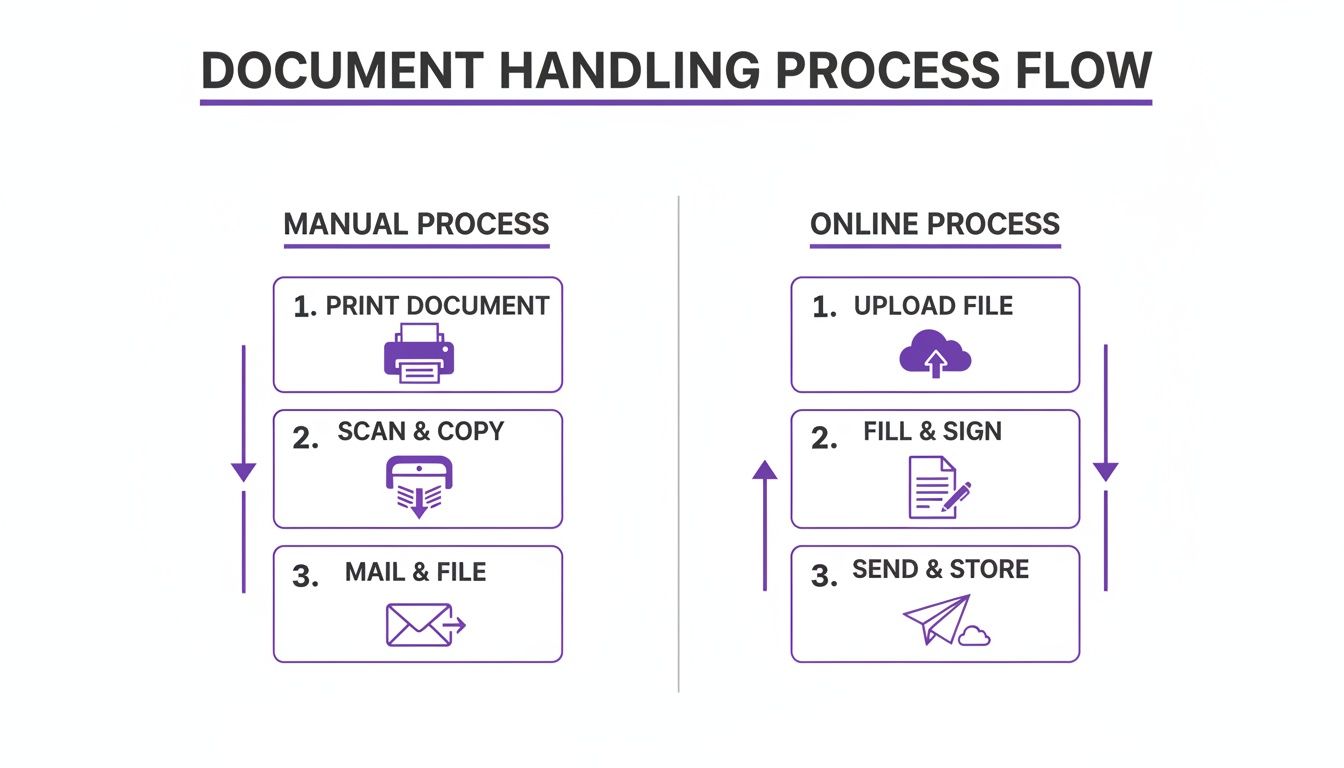
This visual shows it perfectly: online tools get rid of the printing, the manual signing, and the scanning. Everything happens in one clean, efficient digital space.
Navigating Different Form Fields
PDFs use a few different types of fields to collect information, and a decent online tool will handle all of them without any fuss. Knowing your way around them will make the whole process much quicker.
- Text Fields: These are your bread and butter, the blank spaces for your name, address, or answers to questions. Just click and start typing.
- Checkboxes: For simple yes/no questions or selecting multiple items from a list. A quick click adds a tick or an 'X'; clicking again usually clears it.
- Dropdown Menus: You'll see these when you need to pick from a list of pre-set options, like your state or country. Click the menu, find your choice, and select it.
- Radio Buttons: These look like checkboxes but work differently. You can only select one option from the group. Clicking a new button automatically unchecks the previous one.
My Go-To Tip: Get friendly with the ‘Tab’ key. Hitting it on your keyboard lets you jump from one field to the next in a logical sequence. Honestly, it’s so much faster than clicking into every single box and can easily cut your form-filling time in half.
What if the PDF Isn’t Interactive?
Now and then, you’ll run into a PDF that’s completely 'flat'; it’s basically just a picture of a form. You can click all you want, but nothing happens. Don't panic and reach for the printer just yet.
This is a common headache, and any modern online editor is built to solve it. They come equipped with tools that let you overlay your own interactive elements right on top of the document.
- Add Text Tool: Look for an option that lets you add text. You can then draw a text box exactly where you need it, type in your info, and even tweak the font size to match the original document.
- Add Checkmark Tool: This feature is perfect for those non-clickable checkboxes. It lets you place a tick, cross, or a filled-in circle anywhere you need one.
A crucial part of handling digital documents, whether you're filling them out or signing them, involves preserving formatting when handling PDFs. It’s what keeps your final document looking professional and easy to read.
And if you’re constantly dealing with these static PDFs, it might be worth learning https://www.payly.com.au/blog/how-to-create-editable-pdf-form. Building your own templates from the get-go gives you total control.
Adding Legally Binding E-Signatures to Your Documents
When you're filling out a PDF for a serious business matter, think a client contract or a new service agreement, how you sign it really matters. It's tempting to just drop an image of your signature onto the page, but that won't hold up legally. There’s a world of difference between a simple picture and a secure, legally binding electronic signature.
An e-signature is much more than just a visual representation of your name; it's a secure digital process. Here in Australia, electronic signatures are legally recognised under the Electronic Transactions Acts, but they have to tick a few boxes to be considered valid. The method you use has to reliably identify you as the person signing and show you intended to agree to the terms in the document.
That's where proper e-signature technology comes in.
Creating Your Secure Signature
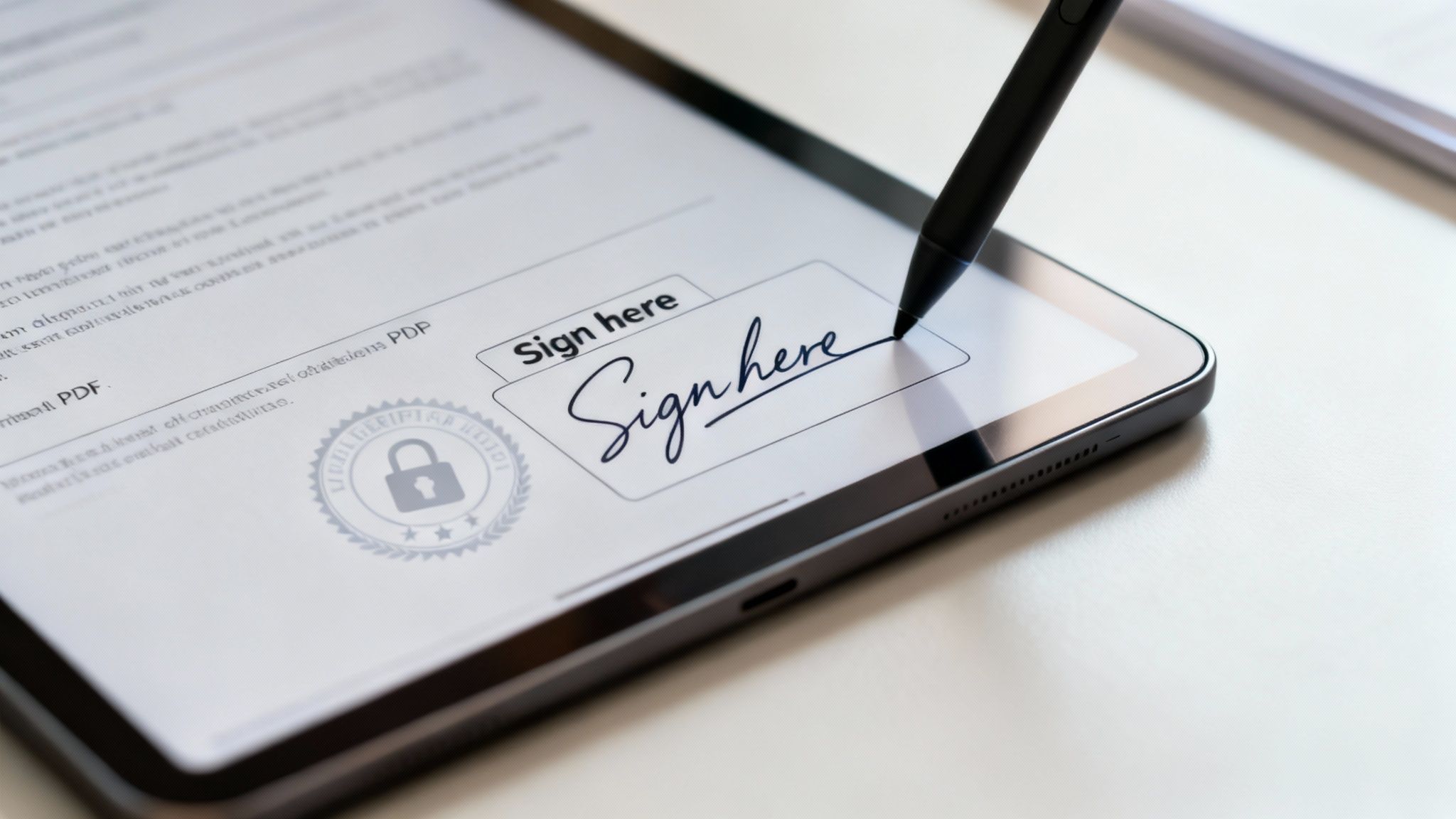
When a good platform asks you to add your signature, it usually gives you a few straightforward options. This flexibility means you can sign in a way that feels natural and looks professional.
- Type it out: Simply type your name, and the tool will generate a handful of slick, professional-looking signature fonts for you to choose from. It’s the fastest and often the neatest method.
- Draw it yourself: Grab your mouse, use your trackpad, or if you have a touchscreen, use a stylus to draw your signature directly on the screen. This adds a more personal, traditional touch.
- Upload a saved image: If you have a high-quality image of your signature on hand, you can just upload it. The platform will then place it into the document for you.
But no matter which option you pick, the real magic happens behind the scenes.
What Makes an E-Signature Legally Sound
The visual signature is just the tip of the iceberg. What truly gives it legal weight in Australia is the security architecture that supports it. Professional e-signature platforms essentially build a digital fence around your document, creating a verifiable and court-admissible record of the entire signing process.
This is where you hear terms like cryptographic audit trails. Every single action is logged: who opened the document, the exact time they signed, and even the IP address of their location. This process creates a detailed, tamper-evident history that proves the signature's authenticity down the track. If you want to get into the nitty-gritty, you can learn more about what is a digital signature and the tech that makes it all work.
In short, a legally binding e-signature isn't about what it looks like. It's about the verifiable, timestamped data trail attached to it, which proves who signed the document and confirms it hasn't been altered since.
This level of security is absolutely crucial for any high-stakes business document. It gives you the confidence you need when finalising client contracts, partnership agreements, or any other form where integrity is everything.
Using a platform that offers this kind of robust validation ensures your agreements are not just convenient but also legally defensible, meeting Australian standards for electronic transactions. That means you can handle critical business paperwork with complete peace of mind.
Keeping Your Information Safe and Secure Online
When you're filling out a PDF form online, especially one packed with client details or sensitive business information, security isn't just a nice-to-have feature. It’s everything. Handing over data to any online platform requires a leap of faith, but that trust has to be earned through solid, transparent security practices.

Before you even think about uploading a document, your first line of defence is right in your browser's address bar. Take a quick glance up there. You're looking for two things: "HTTPS" at the start of the URL and a little padlock icon next to it. This simple check confirms your connection to the site is encrypted, making it incredibly difficult for prying eyes to intercept your data.
Understanding Your Digital Footprint
Beyond that initial connection, it’s crucial to think about what happens to your files after you've finished. A lot of free online tools will hang onto your uploaded documents on their servers, which can be a real privacy nightmare if you're not careful.
Any platform worth its salt will be upfront about how it handles your data. Before you commit to using a service for anything remotely confidential, spend a few minutes digging into its privacy policy. You want to see clear, easy-to-understand language about how your data is stored, who has access to it, and for how long.
My rule of thumb is simple: If I wouldn't leave a physical copy of the document on a public desk, I shouldn't leave a digital copy on an unsecured server. Always choose a service that allows you to permanently delete your files once your task is complete.
This kind of proactive mindset is non-negotiable. Digital adoption in Australia has shot through the roof, with 84.2% of internet users online daily. Naturally, the amount of document handling we do online has grown right alongside it. For small businesses managing sensitive client forms, using a secure platform like Payly, which provides cryptographic security, is vital for maintaining an audit-ready workflow. You can dive deeper into Australia's digital trends and their business implications to see just how important this is.
Practical Security Habits
Getting into a few good habits can dramatically lower your risk when you fill out a PDF form online.
- Avoid Public Wi-Fi for Sensitive Work: That free internet at your local cafe is perfect for scrolling through emails, but it's a terrible idea for handling confidential client contracts. Open networks are notoriously insecure and can expose your data to anyone else connected.
- Choose Platforms with Strong Encryption: Keep an eye out for services that talk about bank-level or end-to-end encryption. This is the good stuff. It means your data is scrambled and unreadable, both as it travels to their servers and while it's stored there.
- Clean Up After Yourself: Once you’ve downloaded your completed PDF, make it a habit to go straight back to the online tool and delete the file from your account. It's a simple step that ensures you aren't leaving a digital trail of sensitive information behind.
Weaving Your Forms Into a Smooth Business Workflow
Knowing how to fill out a PDF form online is a great start, but the real magic happens when you stop seeing it as a one-off task. Think bigger. Think about your entire business process.
If you’re constantly jumping between different apps (one for signing, another for storing files, and a third for tracking time), you're creating friction and losing valuable hours. This kind of disjointed approach is where small inefficiencies snowball into major administrative headaches.
The fix? Move beyond single-purpose tools and find a platform that brings these core functions under one roof. Imagine a world where a signed service agreement automatically kicks off your time tracking and invoicing. This isn't just about making life easier; it's a strategic move to slash admin costs, minimise errors, and look far more professional to your clients.
A Real-World Example: A Melbourne Agency's Transformation
Let’s look at a practical scenario. A small digital agency in Melbourne wraps up a big project for a client. Their old process was a bit of a mess. They'd tally hours in a spreadsheet, build an invoice in a separate program, email it, and then send a project sign-off form using yet another e-signature service.
With an integrated platform like Payly, that whole sequence becomes a single, connected flow.
- Effortless Time Tracking: The team logs all their billable project hours right inside the platform’s time tracker.
- Instant Invoice Generation: Once the project is done, they turn those tracked hours into a polished, branded invoice with just a click.
- Combined Signature & Payment: The final invoice and a service agreement PDF are sent to the client from the same system. The client can open the document, add their legally binding e-signature, and even pay the invoice, all in one go.
This unified approach completely removes the risk of lost files and forgotten follow-ups. The signed agreement is automatically saved, the invoice status updates in real-time, and the agency owner gets a crystal-clear, centralised view of the entire project from start to finish.
The Power of a Connected System
This is what a streamlined workflow actually looks like. An integrated dashboard pulls everything together, giving you a complete picture at a glance.
When you have time tracking, invoicing, and e-signatures all living in the same place, you get an immediate, clear overview of your business operations.
Australia's recent mobile boom has made this kind of efficiency non-negotiable. In 2023, the country recorded 32.71 million cellular connections, a massive 124.3% of the total population. This has firmly established the need to 'fill out PDF form online' as a core activity for any business ditching paper.
With mobile devices now driving 58.13% of all web traffic, small business owners need tools that work perfectly on the go. An all-in-one platform that combines time tracking, invoicing, and e-signatures directly meets this demand, potentially saving businesses up to 95% on software costs. If you're interested in Australia's digital habits, you can explore the government's findings on online user experiences.
To really get your workflow humming, it's worth exploring how to connect your forms with other business tools. You can learn more about seamless form integrations and how they can bridge the gaps between different parts of your business. This is a crucial piece of the puzzle for effective document management software in Australia, turning your static forms into active, intelligent parts of your business engine.
Your Top Questions About Online PDF Forms Answered
Even with the best tools, moving your paperwork online can feel like a big leap. It's only natural to have a few questions. Let's tackle some of the most common ones we hear from Australian freelancers and small business owners, so you can feel confident managing your documents digitally.
Are Electronic Signatures Actually Legally Binding in Australia?
Yes, they absolutely are. In Australia, electronic signatures are given legal weight for most business transactions thanks to the Electronic Transactions Acts. The key is that the method you use must properly identify the person signing and show they intended to agree to the document's terms.
This is exactly why a secure platform is so important. A good service will provide a cryptographic audit trail, which is just a fancy way of saying it creates a detailed, tamper-proof record of who signed what and when. This makes it a rock-solid, legally sound way to handle important agreements and client contracts.
Help! My PDF Form Isn't Fillable. What Do I Do?
This is a classic problem, especially if you're dealing with a scanned document or an older file. Don't reach for the printer just yet! Most modern online PDF editors are built to solve this exact issue.
Look for a tool like 'Add Text Box'. It lets you click anywhere on the document and simply start typing, placing your text right on the lines where it needs to go. The same goes for checkboxes; these tools let you add your own checkmarks or 'X's, turning any static PDF into a fully workable form.
Can I Actually Fill Out a PDF Form on My Phone?
You sure can. For most Aussie business owners, work isn't confined to a desk from 9 to 5. The best online PDF tools are designed to work perfectly on your mobile, letting you upload, complete, and sign documents straight from your phone's web browser.
If you're constantly on the go, an integrated platform often comes with a dedicated app to make the experience even smoother. This means you can handle everything from tracking your work hours to signing off on a final project, all from the palm of your hand.
How Do I Save and Share the Form Once I'm Done?
Once you've filled everything out and added your signature, you'll usually find a couple of straightforward options. The most common is to download the completed file directly to your device. Often, this version is 'flattened', which locks in your edits and prevents anyone else from changing them.
Most platforms also give you a sharing link or let you email the document directly to clients or colleagues. And if you're using an all-in-one system for your business, the signed document is often automatically filed away in your account, keeping your records tidy and secure.
Ready to stop juggling different apps and bring your forms, signatures, and invoicing into a single, smooth workflow? Payly is built for Australian businesses just like yours, giving you everything you need to manage projects and get paid faster. Start your free 14-day trial today.
Payly Team
Sharing insights and strategies to help service businesses thrive. Follow Payly for more tips on time tracking, invoicing, and business operations.
Related Articles


Ready to streamline your business?
Join thousands of freelancers and agencies who use Payly to track time, send invoices, and get paid faster.